
You get accurate, organization-wide visibility into AI adoption, spend, and ROI by pulling data straight from platform admin and analytics APIs, audit logs, and server-side telemetry, not from software installed on employee machines. This approach is more private, scales across thousands of seats without IT pushing installs, and gives finance a clean, cost-center-mapped view of what AI is actually costing and returning. Some AI productivity platforms are built on exactly this model.
TL;DR:
- Extension-free tracking via vendor APIs allows organizations to monitor AI usage and costs without installing software on employee devices, ensuring privacy and scalability.
- Most platforms provide daily or hourly aggregated data, requiring normalization to reconcile across multiple AI tools and avoid real-time reporting delays.
- Privacy compliance demands data minimization, PII removal, role-based access controls, and conducting a DPIA before deploying tracking solutions.
- A typical pilot can be set up within days, but full governance, policy approval, and organization-wide deployment often take several weeks.
- Key KPIs to monitor include active users by team, adoption rates, cost per active user, and use case-driven costs, which help measure AI ROI and adoption success.
Table of Contents
- How Extension-Free Tracking Actually Works
- What Privacy and Compliance Rules Actually Apply?
- How Do You Roll This Out From Pilot to Full Deployment?
- Which KPIs Should Finance and Executives Actually Watch?
- How Configurato Delivers Extension-Free Visibility
- A Leader’s Take on Governance Without Surveillance
- Pilot Configurato: What to Expect and Where to Start
- Where to Learn More
- Sources
- FAQ
How Extension-Free Tracking Actually Works
Every major enterprise AI platform now ships an admin layer built for this exact job. OpenAI’s Admin APIs expose organization-level usage, audit logs, and export tools that IT and finance teams can query directly, no endpoint software required. Claude Enterprise offers a comparable analytics API that reports per-user activity, adoption breakdowns, and cost data at the workspace level.
The canonical method is server-side ingestion: you provision a read-only admin key, the vendor’s API streams usage and cost data on a schedule, and that data lands in your own systems rather than on individual laptops. Once it arrives, you join it against your identity provider (SSO IDs) and your cost-center hierarchy so a raw token count turns into “Engineering spent $4,200 on Claude last month, and 61% of engineers used it at least weekly.”
A few things to expect going in:
- Most admin APIs report in daily or hourly buckets, not real time, so dashboards typically lag by a few hours.
- Aggregation windows vary by vendor, which means reconciling two platforms’ numbers takes some normalization work.
- Usage endpoints, cost endpoints, and audit logs are often separate calls that need to be stitched together, not one unified feed.
None of that requires touching a browser. It is entirely a data-plumbing problem, which is exactly why it scales better than device-level monitoring.
What Privacy and Compliance Rules Actually Apply?
Extension-free tracking is inherently more private than agent-based monitoring, but “more private” is not the same as “automatically compliant.” You still need guardrails, especially once legal and works councils start asking how prompt data is handled.
Start with data minimization. Store aggregated metadata (who used what, when, at what cost) rather than raw prompt text, and apply automatic PII stripping before anything touches a warehouse. The UK’s ICO guidance on monitoring workers is explicit on this point: employers should favor purpose-built APIs with narrow scope over broad device or activity surveillance, and should run a Data Protection Impact Assessment before rolling out any monitoring program. That same guidance stresses transparency and purpose limitation, meaning employees should know what is tracked and why, and that data collected for cost reporting should not quietly get repurposed for performance reviews.
A short compliance sequence that holds up under audit:
- Run a DPIA before the first API key is provisioned, not after.
- Publish an acceptable-use policy that names what gets measured and what does not.
- Rotate and vault admin keys in a proper secrets manager, never in a shared spreadsheet or Slack message.
- Set a retention schedule (often 12 to 24 months for aggregated usage data) and stick to it.
- Restrict dashboard access by role, so raw cost-center detail does not leak beyond finance and the sponsoring executive.
Pro Tip: Treat your admin API key with the same rigor as a production database credential. It can read every user’s activity in the organization, so a leaked key is a much bigger liability than a leaked login.
How Do You Roll This Out From Pilot to Full Deployment?
Most teams can get a rough dashboard running in days. The heavier lift is governance, not engineering, and it typically stretches across several weeks once legal and finance get involved.
- Provision one read-only analytics key for a single vendor and pick one or two pilot teams to start with.
- Ingest daily usage data for two weeks and confirm PII stripping is actually stripping, not just labeled as active.
- Run a compliance check on retention settings and access controls before anyone outside the pilot team sees the dashboard.
- Map cost centers across the rest of the organization and automate the ingest pipeline so it runs unattended.
- Connect spend data to finance systems and set budget alerts so a runaway team gets flagged before the invoice does.
- Assign an executive sponsor and put a quarterly ROI review on the calendar from day one, not after the first budget overrun.
Pro Tip: Pilot with the team most likely to already be power users, engineering or support are common choices, so your early dashboard reflects real usage patterns instead of near-zero activity that tells you nothing.
Full rollout, including the DPIA and policy sign-off, is a cross-functional project. The technical piece is genuinely fast; the governance piece is where most timelines actually slip. For a deeper build-out sequence, Tekkr’s AI usage tracking guide walks through the technical playbook step by step.
Which KPIs Should Finance and Executives Actually Watch?
Four numbers matter more than the rest, and most executive dashboards bury them under too much else.
- Active users (daily, weekly, and monthly) broken out by team, so you can see whether adoption is broad or concentrated in one department.
- Adoption rate, meaning the share of licensed seats actually generating usage in a given week.
- Cost per active user, which turns raw vendor spend into a number you can compare across teams and tools.
- Cost by use case, distinguishing code generation from customer support drafting from internal research, since ROI differs wildly by category.
McKinsey’s global surveys found that while most organizations have adopted AI somewhere, fewer than half report measurable EBIT impact at the enterprise level, and the organizations that do report impact tend to be the ones actively orchestrating adoption rather than leaving it to individual teams. That gap is exactly what a KPI dashboard is meant to close.
Reporting cadence should shift by audience: weekly for the operations team watching usage trends, monthly for finance rollups tied to the billing cycle, and quarterly for the ROI review where budget gets reallocated toward the teams and use cases proving out.
How Configurato Delivers Extension-Free Visibility
Some platforms ingest usage and cost data directly through vendor admin APIs, meaning nothing gets installed on employee devices. They build team-level cost breakdowns, surface which use cases are actually driving value, and layer in gamified rollouts (leaderboards, playbooks) to push adoption higher rather than just measuring it passively.

These platforms often include a privacy architecture that runs end-to-end encrypted, is built for GDPR compliance, and applies automatic PII stripping so raw prompts never sit in a reporting layer. Setup can be relatively quick, and free tiers are sometimes available to let teams pilot before committing budget. Some providers also offer consulting for governance and enablement work that can take longer than the technical setup itself.
A Leader’s Take on Governance Without Surveillance
Visibility into AI usage is an enabler, not a monitoring exercise. Frame it that way internally or you will spend more time managing employee anxiety than actually scaling adoption. The organizations getting real value combine central cost and usage data with team-level playbooks, training, and incentives, echoing what Microsoft and KPMG’s research on frontier firms found about companies that move past pilots into full orchestration. Put one executive sponsor on the hook for it, set quarterly milestones tied to spend and adoption, and review them like you would any other budget line.
Pilot Configurato: What to Expect and Where to Start
Some AI productivity platforms provide privacy-first alternatives to estimating AI ROI from invoice line items alone. A typical pilot produces a usage-and-cost dashboard within days, a validated PII-stripping check, and a one-page executive summary suitable for budget reviews, all without requiring employees to install software.
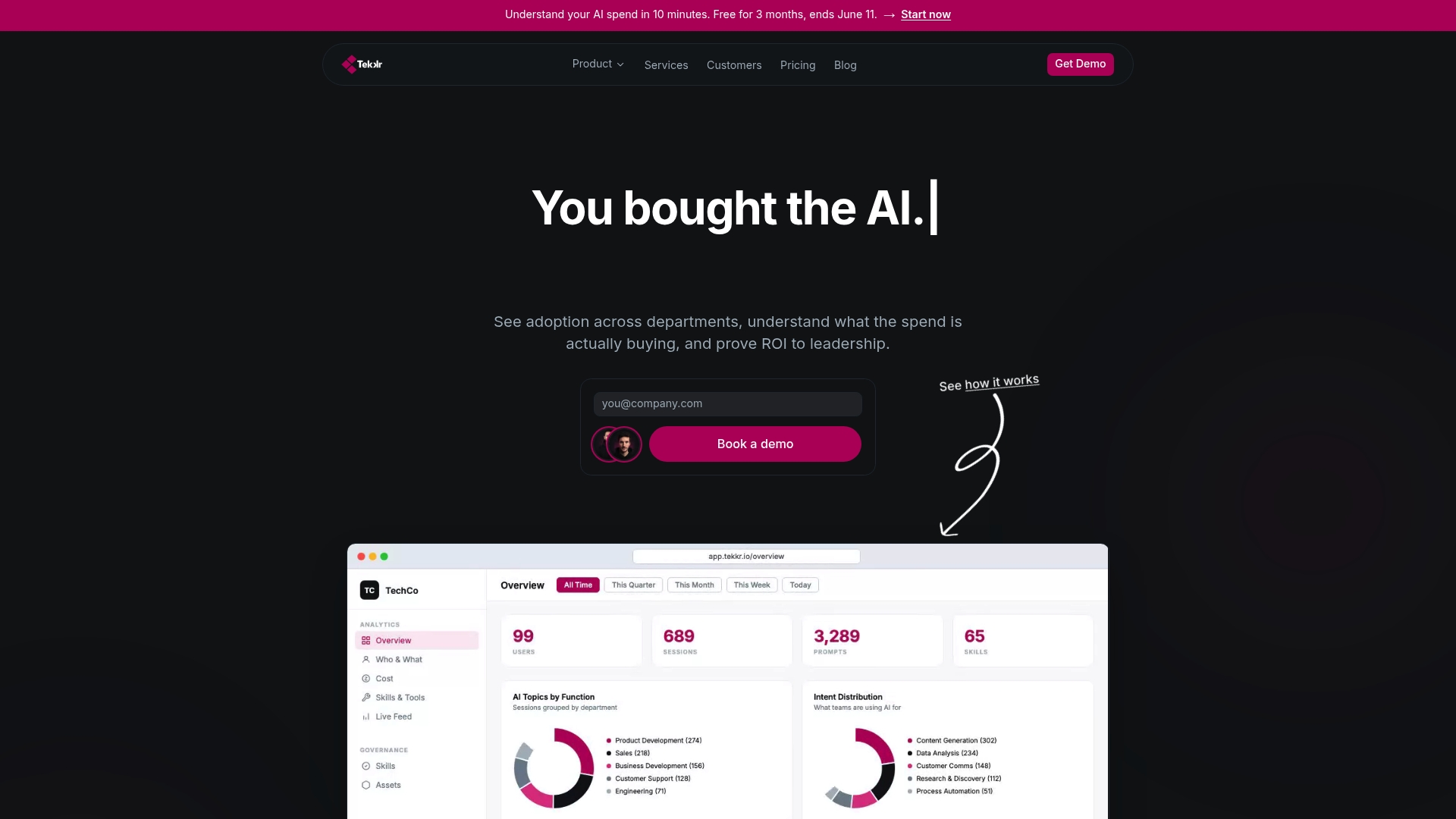
Start by reviewing Configurato’s product page to see how the admin-API ingest and cost-breakdown reporting work in practice. Procurement teams evaluating plans can check current pricing and packaging, while technical leads who want to validate the approach on a specific use case before wider rollout should look at Tekkr’s evaluation and testing tools. If your organization is earlier in the adoption curve and needs structured rollout support, Tekkr’s AI adoption programs pair the analytics with hands-on enablement. Book a walkthrough and get a pilot key provisioned this week rather than waiting for the next planning cycle.
Where to Learn More
For engineers building the ingest pipeline, start with the OpenAI Admin API docs and Claude’s Usage & Cost API. Executives sizing the opportunity should read McKinsey’s state of AI research, and legal or compliance teams should work directly from the ICO’s workplace monitoring guidance. For measuring downstream outcomes once adoption data is flowing, this guide to measuring impact with AI analytics is a useful complementary reference.
Sources
A workable architecture pulls from five sources and reconciles them against one identity model. Skipping any one of these tends to produce a dashboard finance does not trust.
The data model itself is simple in concept: every record needs a user_id, a team_id or cost center, a timestamp bucket (daily works for most reporting), and a cost figure. Joining keys matter more than volume here. A dashboard with perfect token counts but no cost-center mapping is useless to a CFO.
On ingest, rate-limit your API calls to stay under vendor quotas, sample rather than pull every raw event where volume is high, and land everything in a warehouse (or an observability plane) before it hits a BI layer. That separation keeps raw ingestion problems from breaking the dashboards executives actually look at.
FAQ
Can You Track AI Usage Without Installing Browser Extensions?
Yes. Admin and analytics APIs from platforms like OpenAI and Claude Enterprise expose usage, cost, and audit data at the organization level, so no software needs to run on employee devices. Server-side ingestion of that data is now the standard enterprise approach.
Is Extension-Free Tracking More Private Than Browser-Based Monitoring?
It generally is, since admin APIs report aggregated, purpose-built data rather than capturing raw device or browsing activity. The ICO’s guidance on monitoring workers specifically recommends purpose-built APIs over broad device surveillance for this reason.
How Long Does It Take to Set Up Usage Tracking?
A basic pilot dashboard covering daily active users and cost per team can often be built within days once an admin key is provisioned. Full governance work, including a DPIA and access policies, usually takes longer and involves legal and finance sign-off.
What KPIs Should We Track First?
Start with active users by team, adoption rate, and cost per active user, then layer in cost by use case once you have a few weeks of data. These four numbers are what most finance teams ask for first when reviewing AI spend.
Does Tekkr’s Configurato Require Browser Extensions?
No. Configurato ingests data through vendor admin APIs and server-side telemetry, with no extensions or device software required, and runs on an end-to-end encrypted, GDPR-compliant architecture with automatic PII stripping. Setup typically completes quickly, and pricing details are available on Tekkr’s pricing page.