
Start with identity, not endpoints. Pull your OAuth consent logs and run a DNS sweep against known AI vendor domains this week. Together, those two checks surface most unauthorized AI usage inside 72 hours, because employees rarely hide behind sophisticated tunneling. They just click “Allow” on a login screen. Layered detection across network, browser, endpoint, identity, and prompt inspection catches what those two miss, and the framework below shows you where to point each layer.
TL;DR:
- Running identity and OAuth consent reviews on platforms like Microsoft Entra or Google Workspace can uncover most shadow AI tools without disrupting users.
- DNS and proxy log sweeps over the past 30 to 90 days identify active connections to AI vendor domains, helping prioritize high-risk teams and tools.
- Managing AI detection on managed devices involves monitoring installed apps, processes, and extensions, but unmanaged devices remain invisible to endpoint tools.
- Layering detection across network, browser, endpoint, identity, and content inspection provides comprehensive oversight, with each layer covering the blind spots of the others.
- Prioritizing sensitive data exposure risks and broad OAuth permissions during initial detection efforts enables better resource allocation and faster mitigation.
Table of Contents
- What Is Shadow AI Detection and Why Definitions Matter
- The Real Cost of Undetected Shadow AI
- The Five Detection Layers and What Each One Actually Sees
- A Five-Step Framework to Detect Shadow AI This Quarter
- Prioritizing Detection Work and Running an Amnesty Audit
- Building Governance That Prevents Recurrence
- Metrics That Prove Detection Is Working
- Why Observability Beats Prohibition as a Long-Term Strategy
- Where to Go Deeper on Shadow AI Detection
- The Editorial Take: Detection Beats Prohibition Every Time
- Turn Shadow AI Visibility Into Measured Adoption
- Sources
What Is Shadow AI Detection and Why Definitions Matter
Shadow AI is any artificial intelligence tool an employee uses for work without security or IT approval. It’s a subset of shadow IT, but it behaves differently in ways that matter for detection. Traditional shadow IT usually means an unsanctioned SaaS app, a spreadsheet macro, a rogue Dropbox account. Shadow AI adds a layer those tools never had: the system can act on its own, generate outputs that look authoritative but aren’t verified, and ingest whatever data you paste into it, often permanently, often outside your jurisdiction.
Shadow AI detection means finding these tools before they cause a data-loss event, a compliance gap, or a security incident. According to Palo Alto Networks, the practical distinction from shadow IT comes down to visibility and permission. A rogue app is visible once discovered. A rogue AI agent connected via OAuth can keep running, keep learning from new inputs, and keep making decisions long after the person who installed it has forgotten it exists.
In real environments, security teams are finding:
- Browser-based LLM extensions installed from the Chrome Web Store, often bundled with legitimate-looking productivity tools
- Desktop AI applications like local LLM runners or AI-powered note-takers installed without IT provisioning
- OAuth-connected assistants that request calendar, mail, and file scopes and get approved with one click
- Autonomous agents that chain tasks together, calling other APIs or services without a human confirming each step
That last category is the one keeping CISOs up at night. An employee who pastes a customer record into ChatGPT makes one bad decision. An agent configured to “monitor the inbox and respond to vendor requests” can make hundreds of decisions a day, none of them reviewed, and evade user-behavior analytics entirely because it often authenticates as a service account rather than a person.
The Real Cost of Undetected Shadow AI
Ignoring shadow AI doesn’t mean nothing happens. It means you find out about problems from a regulator, a customer, or a breach notification instead of a dashboard.
The governance gap is already wide. ISACA’s research found that AI adoption inside organizations is outpacing the policies meant to control it, leaving many security teams unable to even audit which AI systems touched what data during an incident, let alone stop them mid-event.
Three risk categories deserve separate attention because they fail in different ways:
- Data leakage. An employee pastes a patient record, a contract clause, or source code into a public model with no data-processing agreement. That data may now train the model, sit in vendor logs indefinitely, or surface in another user’s output.
- Compliance and contractual exposure. GDPR, HIPAA, and most enterprise vendor contracts require knowing where regulated data goes. If you can’t answer “did this tool touch protected health information,” you’ve already failed the audit, regardless of whether anything bad happened.
- Operational risk. AI-generated code shipped without review, hallucinated outputs treated as fact, and OAuth tokens with broad scopes sitting in a browser extension nobody’s patched in eight months. Any one of those can hand an attacker a foothold.
Vendor research in this space, including figures from Reco’s shadow AI analysis, suggests a portion of unauthorized GenAI usage in enterprises involves sensitive business data. Treat that as a directional warning rather than a precise benchmark. The exact percentage matters less than the pattern: sensitive data reaches unsanctioned tools often enough that “we’ll find out if it’s a problem” is not a strategy.
Agentic risk compounds all three. A single unreviewed prompt is a one-time event. An agent with standing permissions is a recurring one, and it keeps running until someone notices, which is exactly why detection has to be continuous, not a one-time audit.
The Five Detection Layers and What Each One Actually Sees
No single detection method sees everything. That’s not a limitation you can engineer around. It’s the reason practitioner guidance on shadow AI consistently recommends stacking detection across at least two layers, and ideally across all five described below. Each layer produces a different kind of evidence, and each has a blind spot the next layer covers.
Network and DNS. This layer watches outbound traffic and DNS queries for known AI vendor domains, whether that’s api.openai.com, claude.ai, or a self-hosted model endpoint someone spun up on a cloud VM. It’s cheap to instrument if you already have a proxy or firewall logging DNS, and it tells you a connection happened. What it can’t tell you is who made the request, what data went with it, or whether the traffic was a human typing a prompt or an agent running unattended. Encrypted DNS and personal VPNs also blind this layer fast.
Browser telemetry. Browser-level monitoring, through managed browser extensions or enterprise browser policies, sees page visits, extension installs, and in some cases the content typed into a web-based AI tool. This is where you catch the ChatGPT tab open in a work browser and the sketchy extension that promises to “summarize any page with AI.” Its blind spot is anything outside a managed browser: personal devices, unmanaged laptops, or a browser profile IT never enrolled.
Endpoint. Endpoint detection and response tools see installed applications, running processes, clipboard activity, and file uploads at the moment they happen. This is the only layer that observes local content at the point of transfer, which makes it essential for catching desktop AI apps that never touch a browser at all. Microsoft’s Shadow AI admin experience, currently in preview, is a concrete example: it detects known unmanaged AI agents like desktop versions of ChatGPT and Claude on Windows devices enrolled in Intune, and can block them through Intune policy. The catch is that “managed device” is the operative phrase. Unmanaged laptops and BYOD stay invisible.
Identity and OAuth. This is often the fastest layer to yield results because it doesn’t require installing anything. Reviewing tenant consent grants, service accounts, and OAuth scopes shows you exactly which third-party AI tools have been granted access to mail, calendar, files, or CRM data, and that access persists in the cloud regardless of what device the user is on. Strac’s analysis of shadow AI points out that OAuth consents routinely grant broader scopes than anyone intended, and those grants sit quietly until someone audits them. The blind spot: it shows you the connection exists, not what’s actually been sent through it.
Prompt and content inspection. This is the layer that turns a suspicion into an incident record. Prompt-level DLP and content classification, whether at the browser or endpoint level, can identify when someone actually pasted a Social Security number or a client’s financial data into a model. Without this layer, you know a tool was used. With it, you know what was exposed.
Here’s how the five layers compare on cost, coverage, and what they miss:
| Detection layer | What it sees | Primary blind spot | Typical owner |
|---|---|---|---|
| Network/DNS | Domain reachability, tunneling patterns | User identity, data content | Network security team |
| Browser | Page visits, extensions, page-level prompts | Unmanaged or personal browsers | Endpoint/security engineering |
| Endpoint | Installed apps, processes, clipboard, uploads | Unmanaged or BYOD devices | Endpoint security team |
| Identity/OAuth | Tenant consents, scopes, service accounts | Content of what’s transmitted | Identity and access management |
| Prompt/content inspection | Actual data sent into a model | Requires instrumentation at browser or endpoint | Security/compliance jointly |
Ownership matters as much as coverage. If nobody owns the identity layer specifically, consent reviews slip through the cracks between IAM and security operations, and that’s usually where the biggest surprises hide.
A Five-Step Framework to Detect Shadow AI This Quarter
This is the order that gets you evidence fastest, with the least new tooling. Each step builds on the last, so don’t skip to endpoint work before you’ve mined identity data, most teams find the first two steps alone surface tools they had no idea were in use.
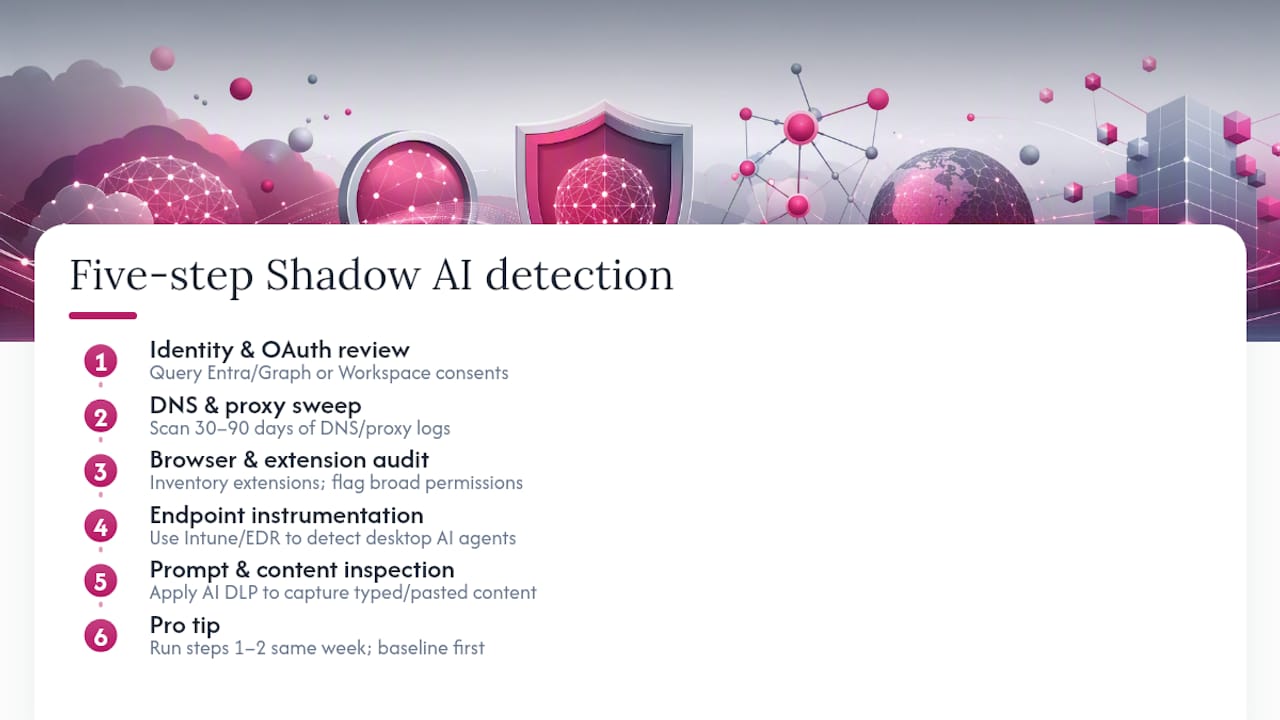
1. Run the identity and OAuth review first. Query Microsoft Entra (via Microsoft Graph) or Google Workspace admin APIs for third-party app consents and service accounts. Filter by known AI vendor domains and by requested scopes, anything asking for mail, files, or calendar read access deserves a second look. This step requires no agents, no rollout, and no user disruption. You’re reading data you already have. Expect a list of surprises within a day.
2. Sweep DNS and proxy logs for AI vendor domains. Pull the last 30 to 90 days of DNS or proxy logs and match against a maintained list of AI service domains. Triage by volume and by which teams generated the traffic, legal and finance hitting an AI writing tool is a different risk profile than engineering hitting a code-completion API. Enrich with a threat-intel feed if you have one, but a static domain list works for a first pass.
3. Audit browsers and extensions on managed devices. Deploy an enterprise browser policy or extension inventory tool across your managed fleet. Cross-reference installed extensions against your AI vendor list, and flag anything requesting broad page-content permissions. This is also where you decide your enterprise browser deployment path, some organizations mandate a managed browser for anyone touching regulated data, which closes a large chunk of this blind spot in one move.
4. Instrument endpoints for desktop AI agents. On managed Windows devices, check whether Intune is deployed and enabled, then review Microsoft’s Shadow AI admin console for detected agents. For non-Windows or non-Intune environments, your EDR platform’s process and file-monitoring rules can be tuned to flag known desktop AI installers and binaries. Decide your blocking posture now: full block, or observe-and-report during an amnesty window (more on that below).
5. Integrate prompt and content inspection. Layer AI-specific DLP onto your browser or endpoint controls to classify what’s actually being typed into these tools. This is the step that changes “someone used an unauthorized tool” into “someone pasted a client’s SSN into an unauthorized tool,” and that distinction is what compliance and legal actually need to assess exposure.
Pro Tip: Run steps 1 and 2 in the same week, before you tell anyone else on the team what you’re doing. Identity and DNS data don’t require user cooperation, and you want a clean baseline before word spreads and usage patterns change.
Prioritizing Detection Work and Running an Amnesty Audit
You won’t detect everything at once, and trying to will burn your budget on the wrong targets. Score every candidate tool or use case on three axes: data sensitivity (does it touch regulated or customer data), exposure vector (is it OAuth-connected, browser-based, or fully autonomous), and business value (would banning it actually hurt productivity, or is it redundant with an approved tool). Regulated data and broad exposure should always jump the queue, regardless of how popular the tool is internally.
An amnesty-based audit gets you honest answers faster than a policy memo ever will. The logic is simple: tell employees that disclosed usage during a defined window carries no penalty, and you’ll get more truthful data than any audit could extract on its own.
A workable amnesty survey asks:
- Which AI tools do you use for work tasks, including browser extensions and desktop apps?
- What kind of data have you input, in general categories (customer data, source code, financial records, none of the above)?
- Did you connect the tool to your company account via Google, Microsoft, or another single sign-on provider?
- Would a company-approved alternative meet your current use case?
Pair the survey with a short, protected timeline, typically two to four weeks, during which disclosed usage is inventoried but not penalized. After that window closes, migrate disclosed users to sanctioned equivalents with a clear fast-path: pre-approved tools, a one-click provisioning process, and a named contact for exceptions.
Pro Tip: Offer a small incentive for early disclosure, first-week responders get priority access to the sanctioned tool’s premium tier, for instance. It costs you almost nothing and meaningfully increases your response rate.
Building Governance That Prevents Recurrence
Detection tells you what’s already happening. Governance is what stops the next wave from starting, and it only works if the sanctioned path is easier than the shadow one.
A workable AI policy needs four components, and skipping any one of them leaves a gap someone will eventually find:
- Allowed use definitions that name specific approved tools and specific prohibited use cases, not vague language like “use AI responsibly”
- Data handling rules that specify what categories of data can never leave the organization’s boundary, regardless of tool
- An approval workflow fast enough that requesting a new tool takes days, not months, or people will bypass it
- Incident response steps specific to AI events: who gets notified, how exposure gets assessed, what the remediation timeline looks like
Sysdig’s guidance on shadow AI frames the right posture as enablement plus enforcement, and that framing holds up under scrutiny. Enablement means negotiating enterprise agreements with the AI vendors your teams actually want, building a sanctioned user experience that doesn’t feel like a downgrade, and training people on why the policy exists, not just that it exists. A deeper breakdown of this approach lives in Tekkr’s guide to AI governance strategies for innovation and compliance.
Enforcement is the backstop for whoever ignores the sanctioned path anyway. That means AI-aware DLP rules on managed endpoints, role-based access control tying AI tool permissions to job function, device-level blocking for known unauthorized agents on managed hardware, and a recurring cadence, quarterly at minimum, for reviewing OAuth consent grants before they become forgotten liabilities. Tekkr’s overview of scalable AI enablement covers how to build that sanctioned fast-path without slowing teams down.
Metrics That Prove Detection Is Working
Security programs get funded when they can show a number moving in the right direction. Shadow AI detection is no exception, and the KPIs worth tracking split into two buckets: coverage and outcome.
Coverage metrics answer “how much of our environment can we actually see”:
- Inventory coverage: percentage of departments or business units with a completed AI tool inventory
- Identity coverage: percentage of OAuth-connected third-party apps reviewed and classified in the last quarter
- Endpoint coverage: percentage of managed devices with AI agent detection enabled
Outcome metrics answer “is detection actually reducing risk”:
- Exposed data items discovered: count of sensitive data instances (PII, PHI, source code) found in AI tool interactions
- Incidents prevented or contained: number of shadow AI events caught before external exposure occurred
- Mean time to detect (MTTD) and mean time to remediate (MTTR): how long from tool deployment to discovery, and from discovery to resolution
Report coverage metrics monthly on a SOC dashboard, where operational teams need current visibility. Save outcome metrics and trend lines for the executive and board-level summary, ideally quarterly, where the audience cares less about raw counts and more about direction of travel. ISACA’s research on the governance gap between AI adoption and oversight is a useful data point to include in that executive framing, it gives leadership context for why this work matters now rather than next year.
The ROI case writes itself once you frame it against three costs avoided: the cost of a compliance fine or breach you didn’t have, the analyst hours saved by having an inventory instead of chasing ad hoc reports, and the productivity regained when disclosed shadow tools get migrated to sanctioned equivalents that integrate with existing workflows instead of sitting outside them. Tekkr’s guide on AI tool sprawl walks through how that consolidation math tends to play out across departments.
Why Observability Beats Prohibition as a Long-Term Strategy
Banning AI tools outright feels like the safe move, and it’s usually the wrong one. Prohibition without a sanctioned alternative just pushes usage further underground, onto personal devices and personal accounts where none of the five detection layers reach. That’s the pattern behind most of the shadow AI risk described above: not malicious intent, but a gap between what employees need to do their jobs and what IT has made available to do it with.
Tekkr’s Configurato platform approaches this from the adoption side rather than the enforcement side. It tracks who’s actually using sanctioned tools like Claude and Codex, breaks spending down by team, and surfaces which use cases deliver value, which turns “we think shadow AI is a problem” into a measurable inventory. When employees can see that the approved tool works and IT can see who’s using what, the incentive to go find a workaround drops sharply.
That model only holds up if the observability itself doesn’t create new risk, which is why the architecture matters as much as the dashboard:
- End-to-end encryption and GDPR-compliant data handling throughout
- Automatic PII stripping that anonymizes prompts before they’re ever analyzed
- No browser extension requirement, which removes a common attack surface and a common source of shadow tool sprawl in the first place
- Setup in roughly 10 minutes, with a free tier that doesn’t require a credit card to start measuring adoption
The output security and compliance teams actually need is a clear picture: adoption by team, spend by department, and use-case intelligence that shows where AI is delivering real value versus where it’s just noise. That’s the artifact worth bringing to a board meeting instead of a spreadsheet of guesses.
Where to Go Deeper on Shadow AI Detection
Microsoft’s Shadow AI admin documentation is the most concrete implementation reference available right now for endpoint-level agent detection and blocking on managed Windows devices through Intune. It’s worth reading in full before you scope your own endpoint rollout, since the list of detectable agents and the blocking mechanics are specific enough to shape your timeline.
For the behavioral and governance side, Sysdig’s shadow AI overview lays out the enablement-plus-enforcement argument in more depth than most vendor content bothers to, and Palo Alto Networks’ Cyberpedia entry remains a solid reference for the foundational definitions and risk categories if you need to brief a non-technical stakeholder.
For the operational, layer-by-layer detection model, ShadowLock’s practical guide is the most detailed public resource on sequencing network, browser, endpoint, identity, and prompt inspection work, and it’s worth revisiting as your program matures past the first quarter.
The Editorial Take: Detection Beats Prohibition Every Time
Most shadow AI advice still treats this as a policing problem: find the tool, block the tool, write the memo. That framing consistently loses, because it ignores why shadow AI shows up in the first place, employees adopting tools that make them faster than the sanctioned alternative does. The research bears this out repeatedly: enablement paired with enforcement outperforms enforcement alone, and identity plus DNS review will surface more real exposure in a week than months of policy drafting.
The overrated move is starting with a company-wide ban announcement. It signals urgency without producing evidence, and it teaches employees to hide usage better rather than disclose it. The underrated move is the OAuth consent review nobody wants to run because it sounds boring. It’s the fastest path to a real inventory, and it costs nothing but a few hours pulling data you already have access to.
Prioritize identity and DNS this month. Build the amnesty audit next. Everything else, browser policy, endpoint agents, prompt DLP, follows once you know what you’re actually managing.
— TekkrTools
Turn Shadow AI Visibility Into Measured Adoption
Detection tells you where the risk sits. Tekkr’s Configurato tells you whether your sanctioned AI tools are actually working, which is the piece most detection programs never get to because they stop at the audit. Instead of only chasing unauthorized usage, you get a live view of adoption, spend, and ROI across every team, so leadership can see whether the AI investment is paying off, not just whether people are behaving.
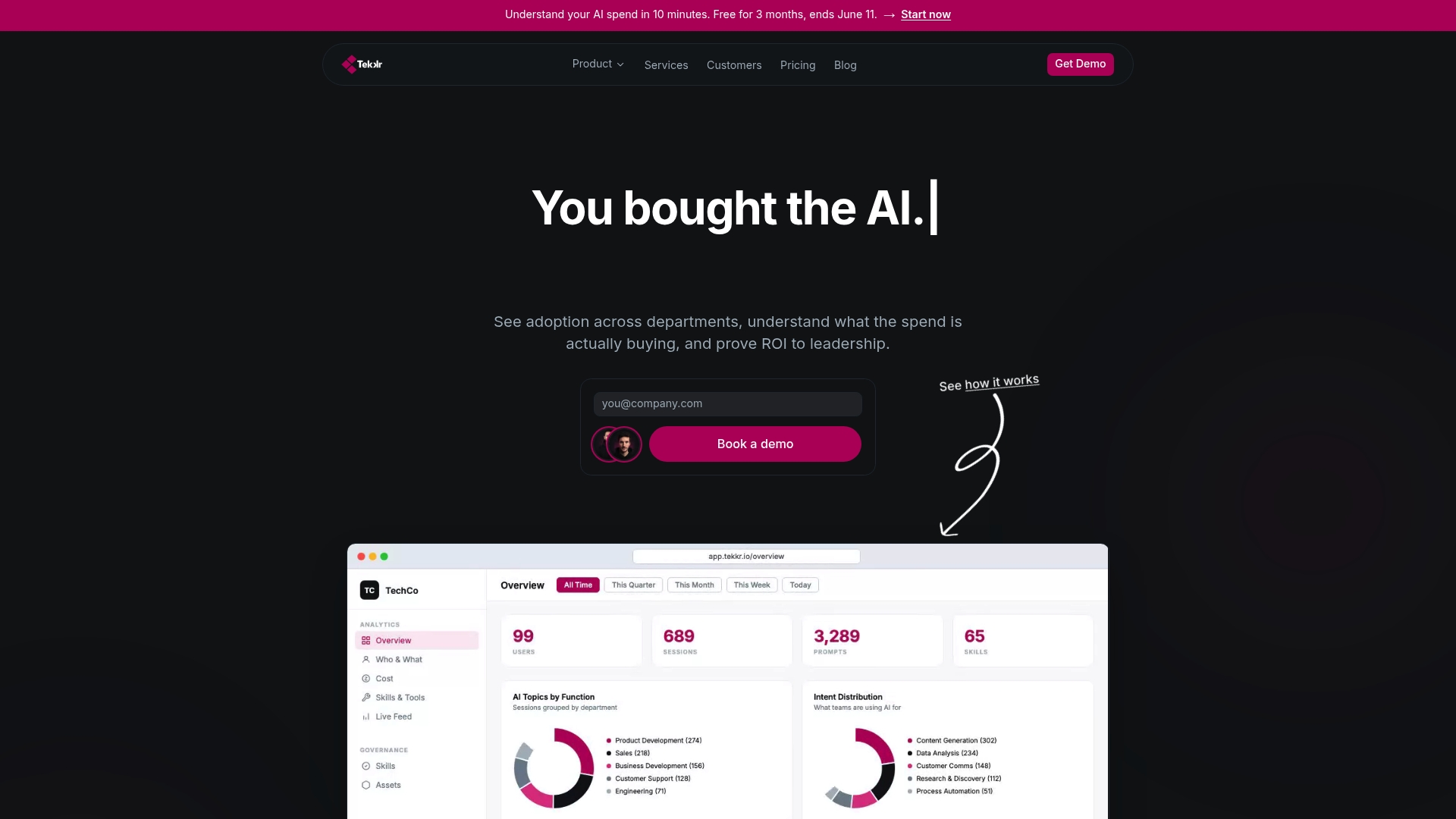
Configurato tracks usage of tools like Claude and Codex by team, breaks down cost allocation department by department, and surfaces the use cases actually driving value, all without a browser extension and with automatic PII stripping baked into the architecture. That combination matters if you’ve just run an amnesty audit and need somewhere credible to migrate disclosed users. For deeper context on measuring what adoption actually looks like at scale, Tekkr’s guide on enterprise AI adoption and Proud Lion Studios’ enterprise AI tool selection guide are worth a read alongside it.
Setup takes about 10 minutes. Start with the free tier of Configurato, no credit card required, and see your organization’s actual AI usage before your next board update.
Sources
- agent-shadow-ai
- How to Detect Shadow AI: A Practical Guide for IT and Security Teams
- What Is Shadow AI? How It Happens and What to Do About It
- AI use accelerates while governance and ROI lag says new ISACA research