
Reduce AI tool redundancy in your organization by running three steps in sequence: inventory every active AI subscription and API key, map each tool to the specific workflow it serves, then rationalize the stack by keeping, consolidating, or retiring tools based on usage depth and governance readiness. That sequence, done once and repeated quarterly, is what separates organizations that control their AI spend from those that keep discovering surprise renewals.
Start here this week:
- Pull your finance/GL export and SSO/SCIM logs to identify every active AI seat and API key, including who owns it.
- Export usage telemetry from each admin console and flag any tool with low active usage compared to purchased seats.
- Add one intake question to your procurement approval flow: “Does this capability already exist in our current stack?”
Run those three steps and you will have the evidence you need to make the first round of consolidation decisions. Expect fewer vendors, lower per-workflow spend, and clearer ownership within 60–90 days.
Key Takeaways
Reducing AI tool redundancy requires a repeatable operating discipline, not a one-time audit: inventory every tool, map it to the workflow it serves, then rationalize and govern with a named owner and a quarterly review cycle.
| Point | Details |
|---|---|
| Three-step program | Inventory every AI seat and API key, map tools to workflows, then rationalize using a scored decision matrix. |
| Workflow-anchored decisions | Retire tools based on the workflow map, not the vendor list, to avoid removing load-bearing tools. |
| Technical levers | Model routing, prompt compression, caching, and moving deterministic tasks to code reduce both token spend and tool duplication. |
| Quarterly review cadence | Run at least quarterly reviews; teams actively piloting new tools should review more frequently per InformationWeek guidance. |
| Tekkr Configurato | Tracks usage, spend, and ownership across your AI stack to support ongoing consolidation and governance. |
Table of Contents
- What does your quick-start audit look like this week?
- What counts as AI redundancy and why it costs more than you think
- Step 1: How do you build a complete AI tool inventory?
- Step 2: Map tools to workflows so consolidation protects outcomes
- Step 3: How do you decide which tools to keep, consolidate, or retire?
- Step 4: Running the consolidation without breaking production
- AI-specific technical levers that cut compute and tool redundancy
- Step 5: Governance and intake controls that prevent sprawl from returning
- Step 6: KPIs, dashboards, and review cadence
- Common mistakes that cause consolidation programs to fail
- What does a realistic consolidation timeline look like?
- What the consolidation programs that actually work have in common
- Tekkr gives you the visibility to run this program continuously
- Sources
What does your quick-start audit look like this week?
A one-week sprint will not finish the program, but it will give you enough signal to brief an executive sponsor and stop the bleeding on obvious waste.
- Export all subscriptions. Pull every AI-related line item from your GL or procurement system. Include vendor name, contract owner, annual cost, renewal date, and seat count.
- Collect API keys. Query your secrets manager (AWS Secrets Manager, HashiCorp Vault, or equivalent) for any active AI provider keys. Flag keys with no owner attribute.
- Run an SSO/SCIM report. Pull provisioned users per AI application from your identity provider (Okta, Azure AD, or similar). Compare provisioned seats to seats showing login activity in the last 30 days.
- Check browser extension installs. A quick Endpoint Detection and Response (EDR) query or MDM report will surface consumer-grade AI tools employees installed without IT approval.
- Flag immediate wins. Mark any tool where active users are below 20% of purchased seats, any tool whose capability duplicates another tool already in the stack, and any tool with no named owner.
- Install one intake gate. Add the single question “Does this capability already exist in our current stack?” to your software purchase request form. Route any “no” answer to an IT review before approval.
- Draft a one-sentence communication. Send to department heads: “We are auditing AI subscriptions this week. Please reply with any AI tools your team uses that are not in the attached list.” That one message typically surfaces 20–30% more tools than the GL export alone.
Pro Tip: Ask your finance team to flag any vendor invoice containing the words “AI,” “LLM,” “GPT,” or “model” in the line-item description. It is faster than a full GL re-categorization and catches most shadow spend in under an hour.
What counts as AI redundancy and why it costs more than you think
Redundancy in an AI or software context means more than two tools doing the same thing. The operational definition covers four distinct patterns: functional overlap (two tools with the same core capability, such as two meeting summarizers), duplicated workflows (the same job being done by different tools in different teams), duplicated data paths (the same corpus being indexed or retrieved by multiple tools independently), and duplicate tenancy (the same vendor provisioned under multiple workspace accounts, each with its own billing, admin, and audit trail).
The seat invoice is the visible cost. The hidden costs are larger. Cognitive switching cost is real: every additional tool a knowledge worker must context-switch between reduces output quality and increases error rates. Compliance overhead multiplies with each vendor: every AI tool that touches sensitive data adds a data processing agreement, a security review, and an audit log to maintain. Fragmented prompt libraries mean your engineering team’s carefully tuned prompts live in one tool while your customer success team reinvents the same logic in another. And fragmented tenancies create multiple audit trails and data residency footprints that block organizational governance and reuse.
Tool sprawl also weakens security. Each additional vendor is an additional attack surface, an additional set of API credentials to rotate, and an additional data residency commitment to track. Tool sprawl raises costs, fragments data, and weakens security; the recommended operational sequence is inventory, map, choose a primary platform per workflow, retire duplicates, and enforce intake rules.
Step 1: How do you build a complete AI tool inventory?
The inventory is the foundation. Without it, every consolidation decision is a guess. Enterprise leaders need a plain view of AI usage — who is using which products and models, how much capacity they’re consuming, and what work that usage supports — so spend can be interpreted and governed rather than misread as waste or ungoverned adoption.
Fields to capture for every tool:
- Tool name and vendor
- Business unit and named owner (a real person, not a team)
- Primary workflows supported (list up to three)
- Active users in the last 30 days vs. purchased seats
- Renewal date and contract term
- Annual cost and billing model (per seat, per token, flat)
- API keys in use (yes/no, count)
- Data types handled (PII, financial, IP, public only)
- Integrations and connectors (list systems it touches)
- Data retention settings and export capability
- Replacement difficulty (low/medium/high)
Where to pull each field:
| Field | Source |
|---|---|
| Cost and renewal date | Finance/GL or procurement system |
| Seat count and provisioned users | SSO/SCIM provider (Okta, Azure AD) |
| Active usage | Admin console usage reports or API logs |
| API keys | Secrets manager, CI/CD environment variables |
| Data types handled | Data classification tool or owner interview |
| Integrations | Admin console, connector logs, or owner interview |
| Retention settings | Vendor admin console or DPA |
Shadow AI discovery is where most inventories fall short. AI tool sprawl typically starts with decentralized buying, and a meaningful share of active AI usage never appears in the GL. To surface it, query your EDR or MDM for browser extension installs matching known AI vendor names, run a DNS or proxy log query for traffic to AI provider API endpoints, and send the one-sentence department-head email described in the quick-start checklist above.
Pro Tip: Filter your proxy or firewall logs for outbound HTTPS traffic to domains like openai.com, anthropic.com, cohere.com, mistral.ai, and similar. Any department generating consistent traffic to an AI API that has no corresponding procurement record is a shadow AI signal worth investigating.
Step 2: Map tools to workflows so consolidation protects outcomes
An inventory tells you what exists. A workflow map tells you what would break if you removed it. That distinction is what separates a consolidation program that delivers savings from one that triggers an incident at 2 AM.
Group tools first by capability category: chat and generation, coding assistance, retrieval and RAG, meeting intelligence, and orchestration/agents. Then map each category to the concrete jobs it performs. “Summarize sales calls” is a job. “Generate code snippets from a ticket description” is a job. “Populate incident tickets from monitoring alerts” is a job. A tool that serves one job for one team is a very different retirement risk than a tool that serves six jobs across three business units.
A minimal workflow map entry looks like this: Actor (who runs the workflow), Input (what data enters the tool), Output (what the tool produces), Success criteria (how the actor knows it worked), and Replacement difficulty (what would need to change if this tool disappeared tomorrow). A consolidation framework that maps tools to workflows, classifies data sensitivity and integration depth, and scores tools on replacement difficulty and governance readiness produces defensible keep/consolidate/retire decisions.
Prioritize these workflows for rationalization first:
- High-repetition workflows running at scale (hundreds of executions per week), where token cost compounds quickly
- Workflows with regulatory data exposure (PII, PHI, financial records), where each additional vendor adds compliance risk
- Workflows owned by a single person, where departure creates a knowledge gap
- Workflows where two or more tools produce functionally identical outputs for different teams
Workflows that are business-critical, deeply integrated, and hard to migrate should be rationalized last, with parallel runs and rollback plans in place before any decommissioning.
Step 3: How do you decide which tools to keep, consolidate, or retire?
Score every tool in your inventory against five dimensions. Usage depth: what percentage of purchased seats are active, and how frequently? Switching cost: how much prompt engineering, fine-tuning, or integration work is embedded in this tool? Compliance dependency: does a regulatory requirement name this vendor or require specific data handling that limits substitution? Integration sunk cost: how many downstream systems connect to this tool, and how complex are those connectors? Strategic value: does this tool provide a capability your primary platform cannot replicate today?
| Decision | Criteria |
|---|---|
| Keep | High usage depth, unique capability, low switching cost, compliant |
| Consolidate | Overlapping capability with a kept tool; migration is feasible |
| Restrict | Low usage, no unique capability, but active workflows need migration first |
| Sandbox | Experimental, no production workflows, budget-capped |
| Retire | Zero active usage, no unique capability, or compliance risk outweighs value |
Attach KPIs to each decision: cost per active user (annual cost divided by 30-day active users), cost per workflow (annual cost divided by distinct jobs served), adoption trend (is active usage growing or declining quarter over quarter?), and risk exposure (does this tool handle sensitive data without a signed DPA?).
When presenting verdicts to procurement and finance, lead with the cost-per-active-user figure. It translates immediately. A tool costing $48,000 per year with 12 active users out of 200 provisioned seats is a $4,000-per-user spend that no CFO will defend once it is on a slide. For the executive sponsor, pair the cost figure with the migration complexity: a low-cost, low-complexity retirement is an easy win; a high-cost, high-complexity consolidation needs a business case with a migration budget line.
For intake policy, a single gate works: any new AI tool purchase requires a written answer to “Does this capability already exist in our current stack?” If the answer is yes, the purchase is denied unless the requester can demonstrate a material gap. If the answer is no, the purchase routes to IT for a 48-hour security and integration review before approval.
Step 4: Running the consolidation without breaking production
Sequence matters more than speed. Moving too fast is the single most common reason consolidation programs create incidents.
Recommended sequence:
- Retire unused seats first. Cancel subscriptions with zero active users. No migration needed, no user impact, immediate savings.
- Consolidate peripheral workflows. Merge tools serving low-criticality, low-volume jobs into your primary platform. Run the new workflow for two weeks before decommissioning the old tool.
- Migrate critical workflows last. Run old and new tools in parallel for at least 30 days. Define acceptance criteria before you start, not after.
Migration playbook checklist:
- Export all prompts, templates, and fine-tune configurations from the retiring tool
- Re-point connectors and integrations to the replacement tool in a staging environment
- Run integration QA against all downstream systems
- Deprovision SSO/SCIM access for the retiring tool only after QA passes
- Capture and archive audit logs from the retiring tool before account closure
- Confirm data retention and deletion per your DPA obligations with the retiring vendor
Acceptance test examples: For a meeting summarizer migration, compare output quality on 20 real recordings using a blind review rubric. For a code assistant migration, measure acceptance rate of suggestions over a two-week pilot with the same engineers. For a RAG tool migration, test retrieval accuracy against a fixed benchmark query set before and after.
Communication template points:
- To users: “Tool X will be retired on [date]. Your workflows will move to Tool Y. Here is a 10-minute guide to the differences.”
- To managers: “We are consolidating [N] tools into [M]. Your team’s workflows are mapped in the attached document. Please flag any gap by [date].”
- To executives: “Phase 1 retirements are complete. Savings realized: $[X]. Phase 2 migrations begin [date]. Risks and rollback plans are in the attached status report.”
For teams with limited central IT support, a practical rollout guide can help structure the migration without requiring a dedicated IT project manager.
AI-specific technical levers that cut compute and tool redundancy
Most AI spend problems are workflow architecture problems. The tool count is a symptom; the root cause is usually that LLMs are being invoked for tasks that do not require reasoning.
Model routing and right-sizing is the highest-leverage lever. Reserve frontier models (GPT-4o, Claude Opus, Gemini Ultra) for tasks that genuinely require complex reasoning: multi-step analysis, nuanced drafting, and novel problem-solving. Route classification, extraction, summarization of structured data, and intent detection to smaller, faster, cheaper models. The cost difference between a frontier model and a capable mid-tier model for a classification task can be an order of magnitude per token.
Prompt compression reduces token usage on every call. Techniques include removing redundant context, using structured formats (JSON schema, XML tags) instead of verbose natural language instructions, and storing reusable context in a retrieval layer rather than injecting it into every prompt. For technical methods like caching, model sizing, and prompt compression, the compounding effect across high-volume workflows is significant.
Caching repeated outputs is underused. If your application calls an LLM with the same or near-identical prompt more than once per hour, semantic caching (tools like GPTCache or Redis with vector similarity) can serve cached responses for a fraction of the cost of a fresh inference call.
Moving deterministic tasks to code is the most aggressive lever. If a task has a fixed logic path (format conversion, field extraction from structured data, rule-based classification), replace the LLM call with a function. Combining caching, model routing, prompt compression, and moving deterministic tasks to code can materially improve GPU throughput and reduce token use in production workloads.
Architectural levers address tool redundancy at the infrastructure level:
- Build a single retrieval/knowledge layer (one vector store, one document index) that all tools query, rather than letting each tool maintain its own index of the same corpus.
- Maintain a shared prompt library in version control so prompt engineering work is reused across teams, not duplicated.
- Use a single orchestration layer (LangChain, LlamaIndex, or a custom API gateway) as the connector between your applications and AI providers, so swapping a model or vendor requires one change, not twenty.
Pro Tip: Track token usage per workflow, not just per vendor. A workflow consuming 10x the tokens of a comparable workflow is almost always a prompt architecture problem, not a model problem. Fix the prompt before upgrading the model.
For teams exploring model efficiency options, Streamline AI publishes practical guidance on caching and model optimization techniques worth reviewing alongside your internal benchmarks.
Step 5: Governance and intake controls that prevent sprawl from returning
Consolidation without governance is a one-time event. The stack will sprawl again within 12 months unless you install the controls that make redundant purchases structurally harder.
The intake gate: Every new AI tool request must answer one question before it reaches procurement: “Does this capability already exist in our current stack?” If yes, the requester must document the gap that justifies a second tool. If no, IT reviews the request within 48 hours for security, data handling, and integration fit. A lightweight intake gate prevents sprawl from restarting without adding bureaucratic friction that drives purchases underground.
Governance checklist:
- Every tool in the inventory has a named owner who is accountable for usage, renewal decisions, and offboarding
- Admin console access is restricted to the named owner and IT; no shared admin credentials
- Audit logs are enabled and retained per your data retention policy (minimum 90 days for most enterprise compliance frameworks)
- Data retention and deletion settings are confirmed and documented for every tool that handles PII or regulated data
- Access controls are reviewed at each quarterly renewal cycle
- Sandbox slots (typically two to four) are available for experimental tools, with a fixed budget cap and a 90-day evaluation window before a keep/retire decision is required
Policy exceptions: Sandbox slots exist precisely so innovation does not require bypassing governance. A team that wants to evaluate a new AI tool gets a sandbox slot, a budget cap, and a 90-day clock. At the end of 90 days, they present a keep/retire recommendation with usage data. No sandbox tool moves to production without passing the intake gate.
Practical admin controls — group limits, workspace defaults, and review requests with project context help leaders support high-value work without broadly raising limits that create runaway costs. Apply the same principle internally: set spending limits per team in your AI provider admin consoles, and require a written justification for any limit increase.
For a cross-functional governance model, an executive guide to cross-team AI adoption covers sponsorship structures and ownership models that hold up at scale.
Step 6: KPIs, dashboards, and review cadence
Consolidation is not a project with an end date. It is an operating discipline. The metrics and cadence you install now determine whether savings persist or erode.
Core KPIs to track:
- Spend by team (monthly, from GL or AI provider billing APIs)
- Cost per active user per tool (recalculate at each quarterly review)
- Cost per workflow (annual tool cost divided by distinct jobs served)
- Active seats vs. purchased seats per tool (the utilization ratio)
- Duplicate capability count (how many tools in the stack serve the same capability category)
- Sensitive-data exposures by tool (count of tools handling PII, PHI, or financial data without a current signed DPA)
Dashboard ownership: Finance owns the spend-by-team and cost-per-user views. IT owns the seat utilization and security exposure views. Your AI Center of Excellence (or the equivalent governance body) owns the capability map and duplicate count. All three views should feed a single executive summary updated monthly.
Review cadence: Effective AI asset rationalization should run at least quarterly; teams actively evaluating new AI tools should review more frequently. In practice, a quarterly review covers renewals, utilization trends, and new intake requests. A monthly check covers spend anomalies and any tool that has crossed a risk threshold (new data type, new integration, ownership change).
Executive report template items: Savings realized this quarter (retired seats plus consolidated licenses), migration status (tools in parallel run, tools decommissioned, tools pending), outstanding risks (tools with no owner, tools with expired DPAs, tools with declining utilization), and recommended renewals or retirements for the next 90 days.
For a deeper look at reducing wasted AI software spend, the cost-allocation tactics there pair well with the KPI framework above.
Common mistakes that cause consolidation programs to fail
Most consolidation programs fail for predictable reasons. Knowing them in advance is the cheapest form of risk management.
Typical mistakes:
- Moving too fast: retiring a tool before its workflows are fully migrated, then discovering the replacement does not handle an edge case that was never documented
- Ignoring shadow AI: completing a consolidation pass on the official stack while 30% of actual usage lives in tools that never appeared in the GL
- Removing tools without migration plans: treating “zero active users” as sufficient justification for immediate retirement, without checking whether those users migrated or simply stopped working
- Over-centralizing without user buy-in: mandating a single tool for all use cases when the tool genuinely does not serve some of those cases well, driving users back to shadow AI
Red flags to watch for:
- A workflow owned by a single person with no documentation: if that person leaves, the workflow breaks and the migration knowledge leaves with them
- Prompts or fine-tunes that cannot be exported from the retiring tool: you are not retiring a tool, you are abandoning work product
- A vendor contract with auto-renewal and a 60-day cancellation window: missing the window means 12 more months of spend
- Regulatory requirements that name a specific vendor or data residency location: substitution may require legal review, not just IT approval
When a red flag appears: Pause the retirement. Assess the actual migration cost, including the time to reconstruct any non-exportable work product. Create a rollback plan before proceeding. The cost of running two tools in parallel for 30 days is almost always lower than the cost of a failed migration.
Consolidation often fails when migration cost is underestimated. Always validate migration cost against the cost of running tools in parallel before decommissioning anything active. Common AI productivity bottlenecks often trace back to exactly this kind of premature decommissioning.
What does a realistic consolidation timeline look like?
For a medium-size enterprise (500–5,000 employees, 15–40 active AI tools), the program typically runs across six phases.
| Phase | Activity | Typical Duration |
|---|---|---|
| Inventory | Pull all sources, build register, shadow AI discovery | Weeks 1–3 |
| Workflow mapping | Map tools to jobs, identify overlap and single-owner risk | Weeks 3–6 |
| Prioritization | Score tools, build decision matrix, brief executive sponsor | Weeks 5–8 |
| Migration | Retire unused seats, consolidate peripheral tools, migrate critical workflows | Months 2–5 |
| Validation | Acceptance testing, audit log capture, DPA confirmation | Months 4–6 |
| Ongoing reviews | Quarterly cadence, intake gate, KPI dashboards | Month 6 onward |
Savings from unused seat retirements show up in the first 30–60 days. Migration costs (engineering time, training, integration refactors) show up in months 2–5 and typically peak during critical workflow migrations. The net savings curve turns positive for most organizations around month 4–6, after which the ongoing cadence is largely operational overhead rather than project spend.
Resourcing the initial pass: Plan for a cross-functional team: one IT lead (owns inventory and technical migration), one finance analyst (owns cost tracking and vendor contracts), one representative from each major business unit (owns workflow documentation), and an executive sponsor (owns decisions and budget). For the initial pass, expect roughly 0.5–1.0 FTE of combined effort per week across the team for the first 8 weeks. The ongoing quarterly cadence typically requires a fraction of that.
What the consolidation programs that actually work have in common
The programs that deliver lasting results share one characteristic that the ones that fail almost never have: they treat the workflow map as the source of truth, not the vendor list.
Every consolidation I have seen that started with “let’s cut vendor count” ended up removing tools that turned out to be load-bearing. The team discovered this at the worst possible time: during a production incident or a compliance audit. The programs that worked started with the workflow map and let the vendor decisions follow from it. That sequence feels slower in week one and saves weeks of remediation in month four.
The single biggest surprise in most programs is shadow AI volume. Organizations consistently underestimate how much AI usage lives outside the official stack. The first inventory pass almost always surfaces tools that no one in IT knew existed, running on corporate data, with no DPA and no audit log. That discovery alone usually justifies the entire program to the CFO.
The governance change that delivers long-term control is not the intake gate, though that matters. It is assigning a named owner to every tool and making that owner accountable for the quarterly renewal decision. When a real person’s name is on the renewal, the renewal gets scrutinized. When it is just a team name or a cost center, it auto-renews forever.
One concrete lesson for procurement and engineering leaders: do not let migration pacing be driven by the vendor’s contract calendar. Drive it by your own acceptance test results. A tool should be decommissioned when the replacement has passed your acceptance criteria, not when the contract happens to expire.
Tekkr gives you the visibility to run this program continuously
Most organizations run a consolidation program once, realize savings, and then watch the stack sprawl again because nothing changed about how tools get approved or measured. Tekkr’s Configurato platform is built specifically for the ongoing discipline this article describes.
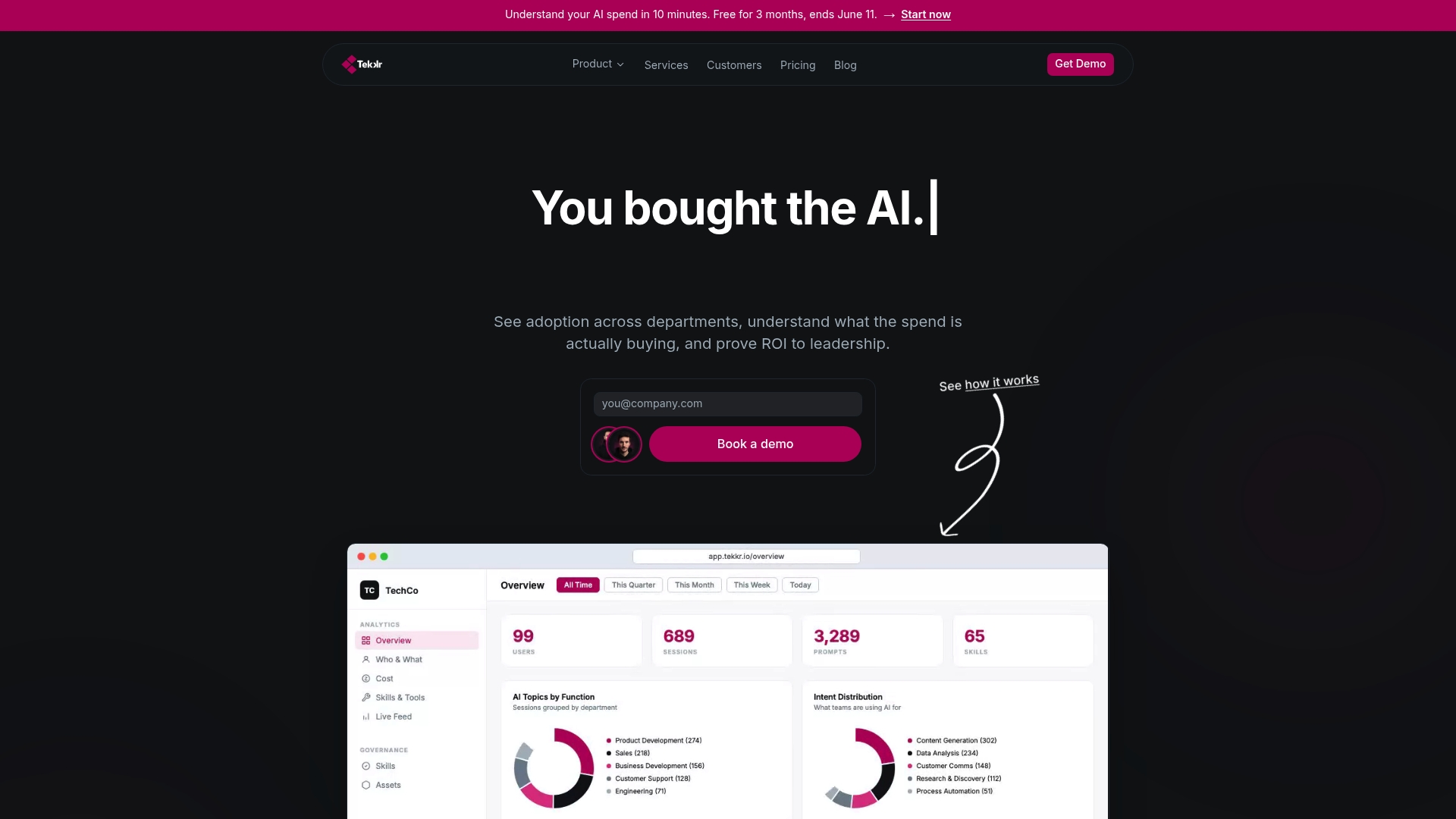
Configurato tracks who is actually using tools like Claude and Codex, breaks down costs by team, surfaces use-case intelligence, and flags underutilized seats before the renewal date. It captures the owner metadata your inventory needs, supports the quarterly review cadence your governance requires, and generates the executive reports your CFO wants to see. The privacy-first architecture is end-to-end encrypted, GDPR-compliant, strips PII automatically, and requires no browser extensions. Setup takes about 10 minutes, with a free tier and no credit card required.
If you are ready to stop discovering AI waste after the fact, start with Configurato and have your first usage and spend dashboard live before the end of the week.
Sources
- How to manage AI investments in the agentic era — OpenAI
- AI Tool Consolidation Framework for 2026 | AI Charcha
- AI Vendor Consolidation: 2026 Enterprise Guide | SUPALABS Blog