
Most leaders assume AI configuration is something their IT team handles during deployment and then forgets about. That assumption is costing organizations real competitive ground. What is AI configuration, really? It is the practice of externalizing and managing the parameters, settings, and instructions that control how an AI system behaves, without touching its underlying source code. Get it right, and your AI tools produce output that fits your workflows from the start. Get it wrong, and you spend months watching employees rework generic AI output that ignores how your company actually operates.
Table of Contents
- Key Takeaways
- What AI configuration actually means
- AI configuration best practices for organizations
- Security and governance risks you cannot ignore
- How configuration shapes AI output quality
- How to implement AI configuration in your organization
- My take on AI configuration in real organizations
- See how Tekkr puts this into practice
- FAQ
Key Takeaways
| Point | Details |
|---|---|
| Configuration is not coding | AI configuration controls model behavior through external settings, not source code changes. |
| Security depends on it | Over half of cloud-native exploitations trace back to misconfigurations, making governance non-negotiable. |
| Governance requires humans | Probabilistic AI outputs must be validated by human reviewers to meet deterministic compliance standards. |
| Personalization drives output quality | Tuning coding style, autonomy levels, and permission scopes directly improves AI relevance and usability. |
| Version control prevents drift | Treating config files like production code with Git prevents the silent failures that plague most AI rollouts. |
What AI configuration actually means
AI configuration externalizes parameters controlling AI behavior without modifying source code. Those parameters include model hyperparameters like temperature and token limits, prompt templates that shape how the AI interprets requests, and backend settings that govern which data sources or APIs the system can access.
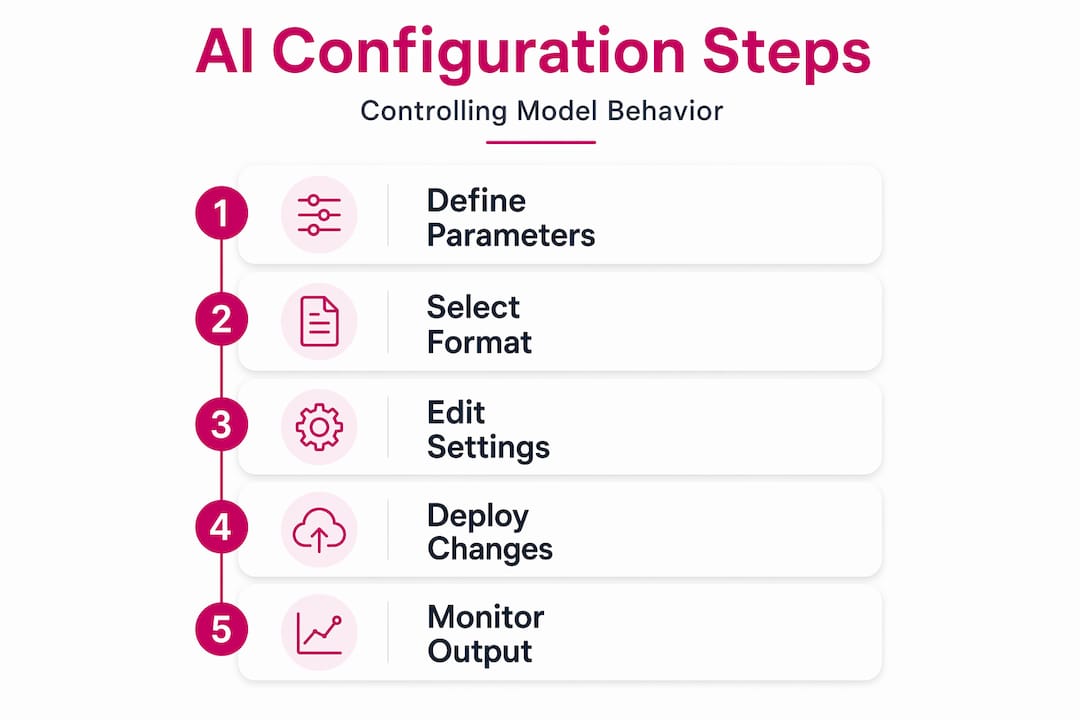
Think of it this way: the source code is the engine. Configuration is everything you adjust to make that engine run correctly for your specific road conditions. You don’t rebuild the engine every time the terrain changes. You adjust the settings.
The most common configuration formats you’ll encounter are YAML, JSON, environment variables, and secrets managers. Each serves a different purpose:
| Format | Best used for | Key advantage |
|---|---|---|
| YAML | Model and pipeline settings | Human-readable, version-controllable |
| JSON | API and service configuration | Widely supported, machine-friendly |
| Environment variables | Runtime and deployment settings | Keeps credentials out of code |
| Secrets managers | API keys, tokens, credentials | Encrypted storage, access control |
YAML is dominant for AI system configurations specifically because it gives technical and non-technical team members a shared, readable format for understanding what the system is doing. When a product manager can read a config file, accountability improves across the whole organization. That is not a small thing.
The practical benefit of separating configuration from source code is that you can deploy the same AI model across development, staging, and production environments with different settings in each, without any code changes. You can also roll back a misconfigured system quickly, which matters a great deal when that system is touching customer-facing workflows.

AI configuration best practices for organizations
Getting AI configuration right is less about the tools you choose and more about the discipline you apply. Clean separation of config files and loaders is the foundation of scalable AI project development. In practice, that means a "config.yaml` file that stores all settings and a loader script that pulls those settings into the application safely at runtime.
Here is a recommended sequence for organizations building or cleaning up their AI configuration architecture:
- Centralize all configurations into a single repository. Scattered config files across teams and environments are the root cause of most configuration drift.
- Apply version control to every config file. Treat AI configuration like production code: use Git, write commit messages, and require code reviews before changes go live.
- Separate sensitive from non-sensitive settings. Model parameters and prompt templates belong in structured config files. API keys, credentials, and tokens belong in a secrets manager.
- Automate deployment of config changes through scripts, not manual edits. Editing config files directly on target machines is how drift starts and how audits fail.
- Document every configuration decision. Future team members, compliance reviewers, and your own engineers six months from now will thank you.
Pro Tip: If a configuration parameter could cause a financial loss or data breach if exposed, it belongs in a secrets manager, not in a YAML file or environment variable. The decision rule is simple: store sensitive configs in an encrypted secrets manager; store everything else in structured, version-controlled files.
The payoff from this discipline shows up in two concrete ways. First, your AI systems become reproducible. Anyone on the team can stand up an identical environment from the config repository alone. Second, you get genuine auditability. When a compliance reviewer asks what your AI model was doing on a specific date, you can show them the exact config that was active. That is a capability most organizations do not have today, and it is entirely achievable with the practices above.
Security and governance risks you cannot ignore
Here is the number that should get every leader’s attention: over 50% of cloud-native exploitations result from misconfigurations. Not from sophisticated zero-day attacks. From settings that were wrong or left unreviewed. In AI applications specifically, a misconfigured system can expose sensitive data, allow unauthorized access, or enable remote code execution.
The governance challenge goes deeper than security settings, though. AI introduces a fundamental tension into configuration management that traditional IT frameworks were not built for:
“AI introduces probabilistic reasoning into configuration management, challenging traditional deterministic governance models.” (AI in Configuration Management: Where Reality Meets Hype)
What this means practically: your compliance framework expects deterministic outputs. Run the same process twice, get the same result. AI does not work that way. Two prompts with identical settings can produce meaningfully different outputs. That gap between probabilistic AI outputs and deterministic audit requirements is where most governance frameworks break down.
The response to this is not to avoid AI. It is to build human-in-the-loop validation into your configuration governance process. Specifically:
- Designate configuration owners for each AI system, with clear accountability for reviewing and approving changes.
- Require human sign-off on any configuration change that affects data access, model behavior in customer-facing systems, or permission scopes.
- Run periodic configuration audits that compare live settings against the canonical source in your repository.
- Monitor AI outputs for anomalies that might signal a configuration change with unintended consequences.
The organizations that get this right treat human validation as a compliance necessity, not an optional review step. That mindset shift matters more than any specific tool you deploy.
How configuration shapes AI output quality
Most people stop at the technical definition when explaining AI configuration. That misses the part that matters most to business leaders: configuration is the primary lever for making AI output actually useful in your specific context.
AI configuration settings impact performance and personalization including coding style preferences, output detail levels, and permission scopes. When a team configures an AI coding assistant with your company’s architecture standards, every scaffold it generates follows those standards without any prompting from the engineer. When a product manager’s AI assistant is configured with your product development lifecycle, the first draft of a spec already reflects your process gates.
User-friendly AI configuration also lowers the barrier for non-technical team members to work directly with AI tools, which drives broader adoption across the organization. The configuration does the heavy lifting so employees do not have to learn how to prompt correctly for company-specific context.
For agentic AI systems, configuration does even more. Effective AI configuration controls autonomy levels and permission-based agent actions, which determines what decisions an AI agent can make independently and what requires human approval. That is not a technical detail. It is a governance decision that belongs in the hands of business and IT leaders together.
Pro Tip: Before configuring autonomy levels for any agentic AI system, map out the decisions that system will make and categorize them by consequence. Low-consequence, reversible decisions can be fully automated. High-consequence or irreversible decisions should always require a human approval step in the configuration.
How to implement AI configuration in your organization
Getting started does not require a complete overhaul of your current AI setup. It requires a structured approach that builds the right habits from the beginning.
- Audit what you have. Catalog every AI tool currently in use across the organization. For each one, identify where its configuration lives, who owns it, and whether it is version-controlled. Most organizations find that more than half of their AI configurations are undocumented.
- Define your governance policy. Decide who can change configurations, what requires review, and what triggers a formal change management process. Write it down and communicate it.
- Build your configuration architecture. Set up a centralized repository, choose your configuration format (YAML for most AI workloads), and establish your secrets management approach.
- Establish baseline configurations. For each AI tool, document the settings that reflect your company’s standards and workflows. This becomes your source of truth.
- Train your team on configuration literacy. This does not mean turning everyone into a YAML expert. It means ensuring that team leads understand what configurations exist, what they control, and who to contact when something behaves unexpectedly.
- Connect configuration outcomes to KPIs. Track metrics like output rework rate, AI task completion quality, and time-to-usable-output before and after configuration changes. This makes the value of the work visible to leadership.
A hybrid human-AI workflow works best here. Let automation handle configuration deployment and drift detection. Keep humans in the loop for configuration design decisions and governance reviews. That division of labor is both practical and, for regulated industries, often a compliance requirement.
My take on AI configuration in real organizations
I’ve worked with enough organizations on AI adoption to say this clearly: the configuration problem is almost always the real problem. Leaders think they have a prompt quality problem, or a model selection problem, or a training data problem. What they actually have is a configuration problem. The AI tool has no idea how their company works, and nobody has taken the time to tell it.
What I’ve learned from watching this play out repeatedly is that the organizations making real progress are not necessarily using better AI models. They’re using the same models, but they’ve done the work of codifying their standards, processes, and quality expectations into configurations that shape every output. The gap between them and everyone else is not the tool. It’s the operational discipline.
The tension between probabilistic AI and deterministic governance is real, and I haven’t seen anyone fully solve it through technology alone. Human judgment in configuration review is irreplaceable, especially in regulated environments. The automation handles the scale problem. Humans handle the accountability problem. Both are necessary, and anyone telling you otherwise is selling you something.
My caution for leaders is this: do not let automation give you a false sense of security. A well-configured AI system that no human is actively reviewing is still a liability. Build the review cadence in from the start, before an audit or an incident forces you to.
— TekkrTools
See how Tekkr puts this into practice
If you’ve made it this far, you already understand that getting AI configuration right is not a one-time setup task. It requires centralized management, version control, governance policies, and ongoing human review. That is a real operational commitment, and most organizations are not set up to handle it alone.
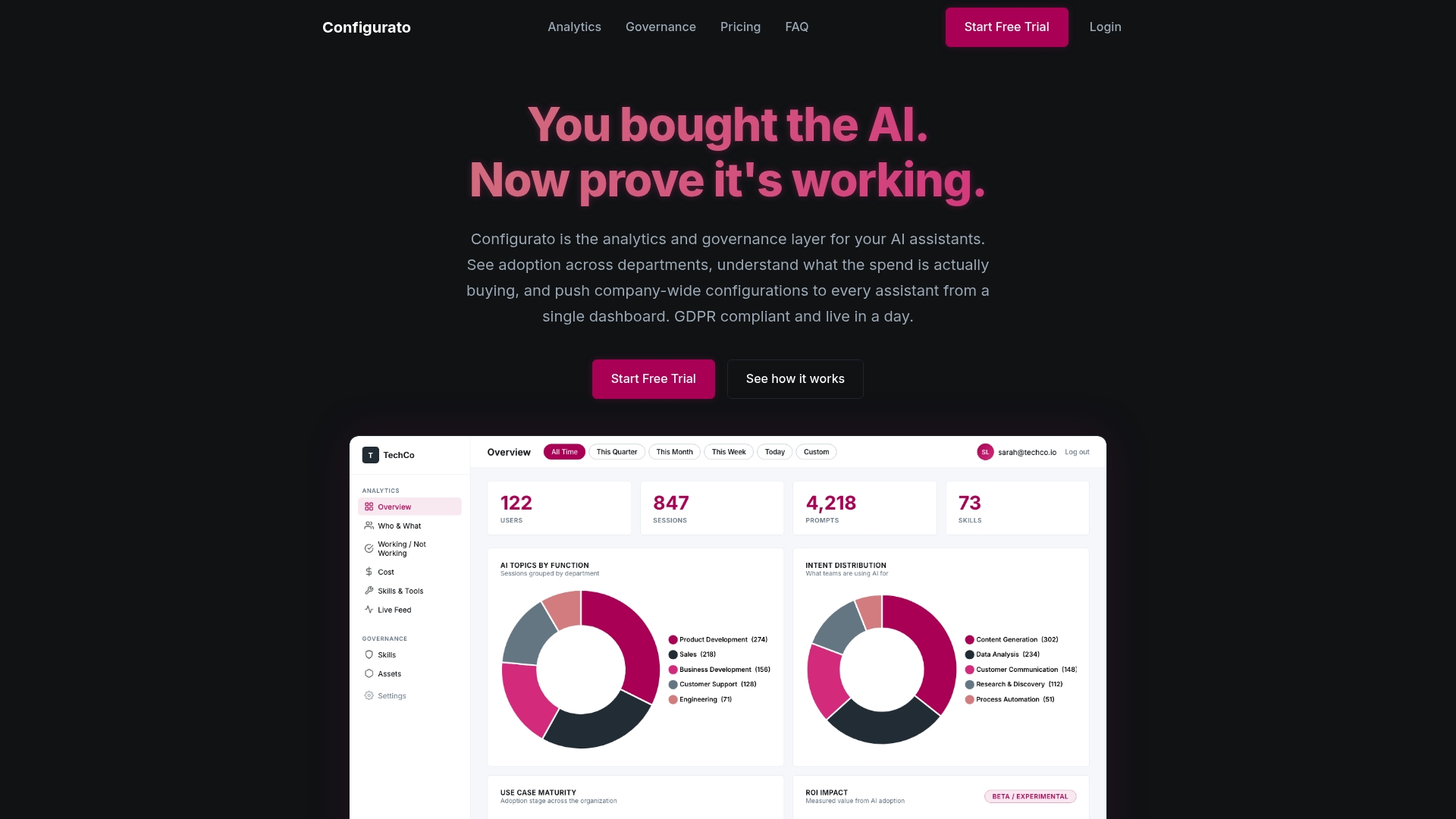
Tekkr’s Configurato platform is built specifically for this. It gives organizations a centralized layer for managing AI assistant configurations, enforcing governance policies, and tracking where configurations are actually driving better output versus where they need refinement. The analytics surface the connection between configuration choices and business outcomes, so you stop guessing and start optimizing based on what the data shows. If your teams are using AI tools without a governance layer underneath, visit Configurato to see what structured AI configuration management looks like in practice.
FAQ
What does AI configuration mean in simple terms?
AI configuration is the process of setting and managing the external parameters that control how an AI system behaves, without changing its source code. This includes model settings, prompt templates, permission scopes, and backend connections.
What are the main benefits of AI configuration?
Properly managed AI configuration makes AI tools more consistent, secure, and aligned with your organization’s specific workflows. It also makes systems auditable, which is critical for regulated industries.
How does AI configuration differ from AI training?
Training teaches a model using data. Configuration controls how a trained model behaves in your specific environment. You configure far more often than you train, and configuration errors are far more common and easier to fix.
What is the biggest risk of poor AI configuration management?
Over 50% of cloud-native exploitations stem from misconfigurations, which can lead to data breaches, credential theft, and unauthorized access. Beyond security, poor configuration produces AI output that does not reflect company standards and requires constant rework.
What tools support AI configuration management?
Version control systems like Git, secrets managers, and centralized configuration platforms are the core toolset. For organizations that need governance and analytics on top of configuration management, platforms like Configurato by Tekkr provide a purpose-built solution.