
Most companies have deployed AI tools. Far fewer are seeing the productivity gains they expected. The gap isn’t the technology. It’s that employees across different roles are using AI the same generic way, prompting broadly, ignoring company context, and spending significant time reworking output that missed the mark. Real ROI from AI only materializes when use cases are aligned to the actual workflows, decision points, and quality standards of specific roles. This article walks you through how to identify high-value role-based AI use cases, compare them across your organization, and implement them in a way that actually moves the needle.
Table of Contents
- How to select role-based AI use cases
- AI usage examples by role: Leaders, managers, specialists, and frontline
- Comparison table: AI configuration and impact across roles
- How to drive adoption and continuous improvement
- The uncomfortable truth about role-based AI: Custom beats generic every time
- Connect with advanced AI governance tools
- Frequently asked questions
Key Takeaways
| Point | Details |
|---|---|
| Tailor AI by role | Aligning AI tools with specific roles delivers maximum productivity and engagement. |
| Use the RISE framework | Role, Intent, Scope, and Expectations help guide the best AI configuration for each position. |
| Prioritize governance | Clear decision rights and ongoing oversight are critical for sustainable AI adoption. |
| Empower power users | Let hands-on leaders guide experimentation and internal best practices for faster results. |
| Continuous iteration wins | Ongoing re-tuning and feedback are essential for maximizing ROI from role-based AI. |
How to select role-based AI use cases
With the importance of specificity in mind, it’s essential to know what makes a role-based AI use case valuable before selecting the right examples for your organization.
A role-based AI use case is simply an AI application designed around the specific tasks, decisions, and outputs of a particular job function. A generic AI tool asks employees to figure out the context themselves. A role-based use case embeds that context from the start, whether that means knowing your product development lifecycle, your financial reporting cadence, or your customer escalation process.
Generic tools fall short for a predictable reason. When an employee opens a general-purpose AI assistant and types a broad prompt, the output reflects general knowledge, not your company’s standards. The result is output that requires heavy editing, misses internal terminology, and fails to reflect the judgment calls your team has spent years developing. That’s not a productivity gain. That’s a productivity tax.
To evaluate potential use cases effectively, use the RISE framework. RISE stands for Role, Intent, Scope, and Expectations. It’s a prompt engineering approach that maximizes tailored outputs by forcing clarity on who is asking, why they’re asking, what boundaries apply, and what a good answer looks like. When you apply RISE at the use-case selection stage, you’re not just picking AI features. You’re defining what success looks like for each role before a single prompt is written.
Here are the key criteria for evaluating and selecting role-based AI use cases:
- Measurable impact: Can you tie the use case to a specific metric, such as time saved per task, reduction in rework cycles, or faster decision turnaround?
- Fit with existing processes: Does the use case slot into how the role already works, or does it require significant workflow redesign?
- Governance readiness: Is there clarity on who reviews AI output, what data the AI can access, and how errors are caught?
- Scalability: Can this use case be rolled out across a team or department without requiring individual customization for every user?
- Adoption likelihood: Is the role already comfortable using AI tools, or does this require significant change management investment?
Pro Tip: Don’t start with the most complex use cases. Identify two or three motivated power-users in each role and run a focused pilot. Their feedback will surface configuration gaps faster than any internal planning session, and their early wins become the proof points that drive broader adoption.
The discipline of governing AI adoption at the use-case level, rather than the tool level, is what separates companies that see compounding returns from those that plateau after initial deployment.
AI usage examples by role: Leaders, managers, specialists, and frontline
Now that you know what to look for, let’s examine top examples by major organizational role, revealing how tailored AI implementations drive real outcomes across the enterprise.
Executive leaders have the most to gain from AI that compresses decision cycles. Their time is the scarcest resource in the organization, and most of their work involves synthesizing large volumes of information into clear choices.
- Scenario modeling for strategic decisions: AI can generate multiple plausible futures based on financial inputs, market signals, and operational constraints, giving executives a structured view of risk and opportunity before committing to a direction.
- Executive summary generation: AI converts lengthy reports, board materials, and analyst briefings into concise, action-oriented summaries that surface the three or four things that actually require a decision.
- Competitive intelligence synthesis: AI monitors and consolidates signals from earnings calls, press releases, and industry publications into a weekly briefing tailored to the executive’s strategic priorities.
Benefits for executive leaders:
- Faster access to decision-relevant information
- Reduced time spent in preparatory briefings
- Better-informed choices with broader scenario coverage
Managers sit at the intersection of strategy and execution. Their AI use cases tend to focus on visibility and prioritization.
- Dashboard generation and narrative summaries: AI pulls data from multiple systems and generates a plain-language summary of team performance, flagging anomalies and suggested actions.
- Prioritization assistants: AI helps managers triage competing requests using predefined criteria, such as revenue impact, customer urgency, or strategic alignment, reducing the cognitive load of constant reprioritization.
- Meeting preparation and follow-up: AI drafts pre-read materials and post-meeting action summaries, keeping teams aligned without adding to the manager’s administrative burden.
Benefits for managers:
- Clearer visibility into team performance without manual data wrangling
- Faster, more consistent decision-making on competing priorities
- Reduced time on administrative coordination
Specialists, including product managers, analysts, engineers, and legal professionals, benefit most from AI that accelerates the production of high-quality work product.
- Rapid drafting with embedded standards: AI generates first drafts of specifications, proposals, or analyses that already reflect internal quality standards and terminology.
- Data extraction and structuring: AI converts unstructured inputs like customer feedback, research notes, or contract language into structured formats ready for analysis.
Frontline teams need AI that reduces friction in the moment, not AI that requires careful prompt crafting.
- Automated customer support routing: AI interprets incoming requests and routes them to the right team or generates a first-response draft, reducing handle time significantly.
- Dynamic SOP guidance: AI surfaces the relevant standard operating procedure step in real time based on what the employee is working on, eliminating the need to search through documentation.
“Prompt engineering using the RISE framework, which defines Role, Intent, Scope, and Expectations, is one of the most effective ways to align AI output to the specific needs of a role. Without this structure, even the best AI tools produce generic results that require significant rework.”
The pattern across all these examples is the same. The more the AI understands about the role’s context, the less rework the employee has to do. Investing in evolving AI practices at the role level is what converts AI from a novelty into a genuine productivity multiplier.

Comparison table: AI configuration and impact across roles
With individual uses explored, seeing them side-by-side reveals which roles benefit most from AI and where configuration pivots are pivotal.
| Role | Use case | Key value | Governance complexity | Customization needs |
|---|---|---|---|---|
| Executive | Scenario modeling | Faster strategic decisions | High (data sensitivity) | High (strategic context) |
| Executive | Summary generation | Time savings on briefings | Medium | Medium (format standards) |
| Manager | Dashboard narratives | Operational visibility | Medium | Medium (data sources) |
| Manager | Prioritization assistant | Reduced decision fatigue | Low to medium | Medium (criteria definition) |
| Specialist | Rapid drafting | Faster, higher-quality output | Medium | High (domain standards) |
| Specialist | Data extraction | Structured inputs for analysis | Low | Medium (schema definition) |
| Frontline | Automated support routing | Reduced handle time | Medium | Low to medium |
| Frontline | Dynamic SOP guidance | Fewer errors, faster resolution | Low | Low (documentation access) |
A few patterns stand out when you look at this table. Specialist roles carry the highest customization needs because the quality bar for their output is defined by domain expertise and internal standards. Getting a product spec or a legal summary wrong is costly. That’s where prompt engineering and embedded company context deliver the most visible ROI.
Frontline use cases tend to have lower governance complexity and customization needs, which makes them the easiest to scale quickly. If you’re looking for fast wins that demonstrate enterprise-wide value, frontline AI applications are often the right starting point.
Executive use cases carry the highest governance complexity because they involve sensitive data and high-stakes decisions. Analytics and governance insights at this level require clear accountability frameworks before deployment, not after.
The 58% of heavy AI adopters who expect a formal shift toward AI decision rights are responding to exactly this reality. As AI moves from drafting assistant to active participant in decision workflows, governance can’t be an afterthought. The table above is a useful starting point for mapping where your organization needs governance investment before scaling.
How to drive adoption and continuous improvement
Recognizing differences is vital, but sustained ROI depends on effective rollout and adaptive governance.
The most common reason role-based AI deployments stall isn’t technical. It’s human. Change management, data trust, and skill gaps are the three adoption blockers that consistently derail well-designed AI programs.
Common adoption challenges:
- Change management resistance: Employees worry that AI will replace their judgment, reduce their value, or expose their work to unfair scrutiny. Without clear communication about the purpose and boundaries of AI use, resistance builds quietly.
- Data trust issues: If employees don’t trust the data feeding the AI, they won’t trust the output. This is especially true for managers and specialists who know where the data quality gaps are.
- Skill gaps in prompt quality: Most employees haven’t been taught how to prompt effectively for their specific role. They default to generic inputs and get generic outputs, which reinforces the belief that AI isn’t useful for their work.
Actionable recommendations for sustainable adoption:
- Start with a phased pilot. Select one or two use cases per role, run them with a small group of motivated users for four to six weeks, and measure outcomes against a baseline.
- Build structured feedback loops. Create a simple mechanism for pilot users to flag when AI output missed the mark and why. This data is invaluable for configuration refinement.
- Develop role-specific prompt libraries. Document the prompts and RISE-aligned configurations that produce the best results for each role. Make these accessible to the broader team as a starting point, not a rigid script.
- Establish phased governance. Start with light-touch oversight, such as requiring human review of AI output before it’s used in decisions, and evolve toward more formal AI decision rights as trust and reliability are established.
58% of heavy AI adopters expect a formal shift to AI decision rights within their organizations. That shift doesn’t happen by accident. It requires deliberate governance design, clear accountability, and ongoing calibration as AI capabilities and organizational needs evolve.
Pro Tip: Set up a power-user community within each major role group. These are the employees who are genuinely curious about AI and willing to experiment. Give them a structured channel to share what’s working, what isn’t, and what configurations they’ve discovered. This community becomes your internal AI capability engine, and it costs far less than external training programs.
The investment in AI governance best practices at this stage compounds over time. Every configuration improvement, every prompt library update, and every governance refinement makes the AI more useful for the entire role group, not just the individual who made the discovery.
The uncomfortable truth about role-based AI: Custom beats generic every time
Too many organizations treat AI deployment as a one-time infrastructure decision. Buy the tool, roll it out, and wait for productivity to follow. That’s not how it works, and the companies still waiting for their AI ROI are learning this the hard way.
The real performance edge comes from ongoing configuration, not initial deployment. Generic AI tools give you generic results. The organizations pulling ahead are the ones investing in role-centric prompt libraries, RISE-aligned configurations, and power-user playbooks that encode institutional knowledge directly into how their AI operates.
Here’s the part most vendors won’t tell you. No AI provider has a financial incentive to help you configure their tool for your specific workflows. That cross-platform, role-specific configuration work is exactly what they can’t monetize. It’s also exactly what determines whether your AI investment pays off.
The companies building real-world governance insights into their AI programs are discovering that configuration isn’t a one-time setup task. It’s a continuous practice. The organizations that treat it that way are the ones compounding their advantage every quarter.
Connect with advanced AI governance tools
Ready to put these insights to work? The right platform is essential for moving from role-based AI theory to measurable productivity gains.
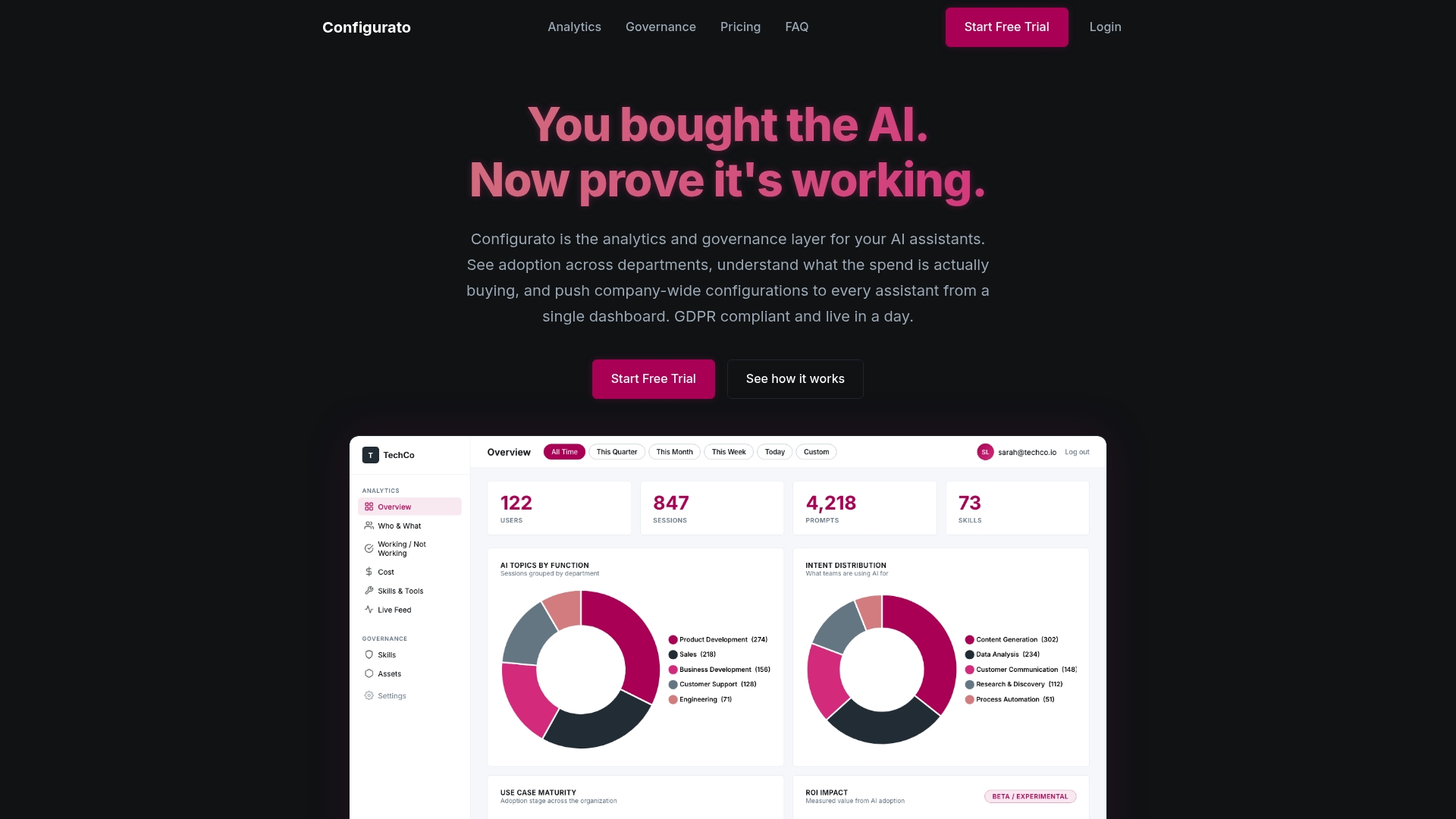
Tekkr helps you embed your company’s processes, quality standards, and domain knowledge directly into the AI assistants your teams already use. No new tools for employees to learn. No generic output to rework. Just AI that already knows how your organization operates, for every role, every workflow, and every quality standard that matters. Whether you’re mapping use cases, building governance frameworks, or tracking where AI analytics and governance is actually accelerating work, Tekkr gives you the infrastructure to make role-based AI configurations stick and scale.
Frequently asked questions
What are the most impactful role-based AI use cases for executives?
Executives benefit most from scenario modeling, rapid executive summary generation, and data-driven decision support, as CEOs who act as power-users build stronger AI intuition and make faster, better-informed decisions.
How does prompt engineering enhance role-based AI?
Prompt engineering, especially using the RISE framework covering Role, Intent, Scope, and Expectations, tailors AI outputs to match specific roles and tasks, maximizing usefulness and reducing the need for rework.
What governance changes are needed for widespread AI adoption?
Many organizations are shifting toward formal AI decision rights, and 58% of heavy adopters expect this shift, which means building new accountability frameworks and clear ownership for AI-driven decisions before scaling.
Should companies rely on generic or custom AI solutions?
Custom AI solutions tailored by role deliver far higher ROI than generic tools, particularly in large organizations where role-specific configurations align AI output directly to internal standards, workflows, and decision-making requirements.