
Picking the right AI assistant for your team should be simple. In practice, it rarely is. 73% of users report increased productivity when their organization deploys a well-integrated internal AI assistant, with an average time savings of five hours per week. Yet most teams still struggle to translate that potential into real, measurable output. The problem is not a shortage of options. It is knowing which criteria actually matter, which assistants deliver in enterprise environments, and how to avoid costly missteps that leave your people using powerful tools in weak, generic ways.
Table of Contents
- How to evaluate AI assistants for your organization
- High-impact examples of AI assistants in organizations
- General-purpose vs. specialized AI: Strengths and pitfalls
- Integrating AI assistants for sustained team productivity
- Why effective evaluation, not features, unlocks AI assistant value
- Supercharge your workflow with tailored AI assistant analytics
- Frequently asked questions
Key Takeaways
| Point | Details |
|---|---|
| Choose by criteria | Select AI assistants using clear, role-driven evaluation criteria—not just features or popularity. |
| General vs. specialized | Specialized AI assistants can outperform general ones on behavioral efficacy and workflow-impact metrics. |
| Integration is critical | Sustained productivity gains depend on thoughtful rollout, team engagement, and robust analytics. |
| Track real outcomes | Use measurable metrics like productivity lift and time saved to assess your AI assistant’s value. |
How to evaluate AI assistants for your organization
With context set, let’s jump into the decision framework you need before picking solutions.
Most managers start by asking “Which AI assistant is best?” That is the wrong question. The right question is “Which AI assistant fits how my team actually works?” Those two questions lead to very different purchasing decisions.
A solid evaluation framework rests on four pillars.
- Productivity impact: Can you measure time savings, error reduction, or output quality improvements before and after deployment? Generic demos do not count. Look for data from organizations with comparable team structures and workflows.
- Integration capabilities: Does the assistant connect to your existing tools, knowledge bases, and communication platforms? An assistant that lives in isolation from your stack will be abandoned within weeks.
- Governance and compliance: Who controls data access? How are permissions managed by role? What audit trails exist? For tech teams handling sensitive product roadmaps or customer data, AI assistant governance is not optional.
- Workflow alignment: Does the assistant operate within your team’s existing processes, or does it require people to change how they work just to use it?
Beyond these four pillars, successful enterprise deployments of AI assistants consistently emphasize three mechanics: role-specific access and governance, retrieval and enterprise knowledge grounding so the assistant answers from your company’s actual data rather than generic training, and tool or action orchestration rather than simple chat-only interaction.
That last point deserves more attention. A chat-only assistant is a glorified search box. The assistants that move the needle are the ones that can actually take action: routing a support ticket, drafting a document in your existing template, triggering a workflow step, or pulling data from your internal analytics dashboard. If the assistant you are evaluating cannot do any of those things out of the box or through integrations, you are looking at a productivity novelty, not a productivity tool.
Common pitfalls when evaluating AI assistants include over-weighting brand recognition, failing to test role-specific performance, skipping governance review until after deployment, and piloting with your most tech-savvy employees instead of your average users. Your average user is the real test. If the assistant works well for them, it will work well for everyone.
Pro Tip: Before any vendor demo, define three to five real tasks your team performs daily. Ask the vendor to complete those tasks live, using your actual terminology and workflow context. You will learn more in 20 minutes than from any feature sheet.
High-impact examples of AI assistants in organizations
Now that you know what to look for, let’s see how these criteria manifest in real AI assistant deployments.

The gap between a generic chatbot and a purpose-built enterprise AI assistant becomes obvious when you look at organizations that got it right. These are not theoretical benefits. They are documented outcomes from teams that went through rigorous evaluation and integration.
Cisco’s internal AI assistant is one of the most instructive examples available. The results speak clearly: 73% of users reported increased productivity, with an average time savings of five hours per week per employee. The assistant handles 156,000 daily interactions and supports over 4,300 teams on its agent platform. Those are not pilot numbers. That is organization-wide adoption with measurable, sustained impact.
“The assistant that matters is the one your team actually uses every day, not the one with the most features in the vendor’s slide deck.”
What made Cisco’s deployment work? Three things stand out. First, the assistant was grounded in enterprise knowledge, meaning it could answer from internal documentation, policies, and processes rather than generic internet data. Second, it was built with role-based access, so employees only saw information relevant to their function. Third, it moved beyond chat to support actual workflow automation.
Other organizations have demonstrated similarly strong outcomes through specialized deployments.
- IT support automation: Teams that deploy AI assistants to handle tier-one IT support queries report significant reductions in ticket resolution time. The assistant routes common issues, retrieves relevant knowledge base articles, and either resolves the issue directly or escalates with full context already attached.
- Knowledge management: In organizations with large, dispersed documentation, AI assistants trained on internal knowledge dramatically reduce the time employees spend searching for information. Instead of a 15-minute search, the answer surfaces in seconds, with a reference to the source document.
- Workflow routing: Engineering teams have used AI assistants to automate the classification and routing of incoming requests, reducing the manual coordination overhead that eats into individual contributor time.
You can track the AI assistant analytics from these deployments to see which workflows benefit most. The distinguishing factor in every high-impact deployment is specificity. These assistants were not used generically. They were configured for particular roles, particular tasks, and particular knowledge domains.
General-purpose vs. specialized AI: Strengths and pitfalls
Not all AI assistants are created equal. Choosing between general and specialized options can define your outcome.
General large language model (LLM) powered assistants, such as Claude, GPT-4o, or Gemini, are remarkably capable at a wide range of tasks. They can draft content, summarize documents, write code, and answer broad questions with impressive fluency. For teams that need flexible, multi-purpose support across varied daily tasks, a general LLM is often the right starting point.
Specialized AI assistants take a different approach. They are trained or fine-tuned for a specific domain, workflow, or use case. A coaching-focused AI assistant, for example, is optimized to support leadership development and behavioral change rather than general content generation. Research on specialized coaching AI suggests these tools can outperform general LLMs on behavioral efficacy metrics, specifically accountability focus, even when the general LLM outperforms on raw task efficiency.
That distinction matters more than most managers realize. Efficiency metrics measure how fast a task gets done. Efficacy metrics measure whether the outcome actually changes behavior or delivers the intended result. For some use cases, those two things diverge sharply.
Here is a practical comparison to guide your thinking.
| Criteria | General LLM assistant | Specialized AI assistant |
|---|---|---|
| Content drafting | Excellent across formats | Strong within domain only |
| Workflow specificity | Requires configuration | Built in by design |
| Behavioral change support | Limited | High for target use cases |
| Integration flexibility | Broad API support | Often narrower ecosystem |
| Time to value | Fast for broad use | Faster for targeted use |
| Governance and audit | Varies by vendor | Often purpose-built |
The pitfall with general LLMs is assuming they will adapt to your team’s specific needs without configuration. They will not, at least not by default. Without grounding in your processes and standards, a general assistant produces generic output that requires heavy rework. That rework cost is invisible in feature comparisons but very visible in your team’s actual productivity numbers.
The pitfall with specialized assistants is over-narrowing. If your team’s needs span multiple domains or roles, a highly specialized tool may cover only a fraction of your use cases, forcing you to maintain multiple assistants and manage the complexity that comes with that.
Pro Tip: Consider pairing a general LLM with a configuration layer that embeds your company’s specific processes and standards. You get the flexibility of a general assistant with the specificity of a specialized tool. That is the AI assistant selection architecture that leading teams are moving toward.
Integrating AI assistants for sustained team productivity
Once you’ve chosen the right AI assistant, sustainable integration determines long-term value.
Choosing the right assistant is half the job. The other half is integration done in a way that sustains adoption over months, not just the first few excited weeks. Most AI assistant rollouts see strong initial usage followed by a significant engagement drop within 60 to 90 days. That drop happens for predictable reasons, and you can prevent most of them with deliberate planning.
Here are the key steps for a phased rollout that holds.
- Define success metrics before you launch. Know what you are measuring: time savings per task, reduction in rework cycles, support ticket volume, or output quality scores. Without baseline data, you cannot demonstrate ROI or identify where adoption is slipping.
- Start with a focused pilot. Choose a team or function with a clear, repetitive workflow that the assistant can support immediately. Avoid piloting with your most enthusiastic early adopters exclusively. Include a representative cross-section of your actual user base.
- Build feedback loops from day one. Create a lightweight mechanism for users to flag when the assistant’s output missed the mark. This data is gold for configuration refinement.
- Configure for your context, not the vendor default. An assistant using generic defaults is an assistant your team will stop using. Embed your terminology, your processes, and your quality standards into the assistant’s behavior from the start.
- Review analytics on a regular cadence. Look at which tasks are being handled well, which are generating rework, and where the assistant is simply not being used at all. Silence in the usage data is usually a signal worth investigating.
The scale of what is possible becomes clear when you look at Cisco’s deployment metrics: 156,000 daily interactions, 73% of users reporting productivity gains, five hours saved per week on average, and more than 4,300 teams supported through the agent platform. That level of sustained adoption does not happen by accident.
Here is what adoption data typically looks like across deployment phases.
| Phase | Timeframe | Key activity | Target adoption rate |
|---|---|---|---|
| Pilot | Weeks 1 to 4 | Focused team testing | 60% active use |
| Rollout | Weeks 5 to 12 | Broader deployment | 70% active use |
| Optimization | Months 4 to 6 | Configuration refinement | 75% active use |
| Steady state | Month 7 onward | Analytics-driven improvement | 80%+ active use |
Common obstacles include employees reverting to manual habits when the assistant produces one bad output, managers not reinforcing AI-assisted workflows in their team rituals, and a lack of visible leadership endorsement. Governance tools that track usage by role and workflow help you spot these engagement slumps early and intervene before they become cultural resistance. Governing AI assistant adoption with the right analytics layer turns anecdotal feedback into actionable signals.
Why effective evaluation, not features, unlocks AI assistant value
Here is the uncomfortable truth: most teams are buying AI assistants the same way they bought SaaS tools five years ago. They look at the feature list, watch a polished demo, and make a decision based on brand recognition and price. The result is a tool that gets used superficially, never embedded into real workflows, and quietly abandoned when the next shiny option arrives.
The organizations seeing sustained productivity gains are doing something different. They start with evaluation criteria, not product catalogs. They define what good output looks like for their specific roles before they ever open a vendor conversation. And they measure outcomes, not adoption rates on paper.
Cisco’s internal results illustrate exactly what this looks like at scale: five hours saved per week per employee is not a feature. It is an outcome that comes from grounding an assistant in enterprise knowledge, configuring it for role-specific access, and building it into daily workflows rather than leaving it as an optional side tool.
The teams using evaluation frameworks for AI that prioritize measurable outcomes consistently outperform those chasing feature parity. If your current AI assistant evaluation process starts with “What can it do?” instead of “What does my team need to achieve?”, you are building toward a productivity plateau, not a productivity leap. Fix the evaluation process first. The right tool choice follows from that.
Supercharge your workflow with tailored AI assistant analytics
If your team is moving from evaluation to execution, generic AI assistant deployment is not going to cut it. You need visibility into what is actually working, governance that keeps your standards embedded across every interaction, and the ability to tailor your assistant’s behavior to your specific workflows without starting from scratch.
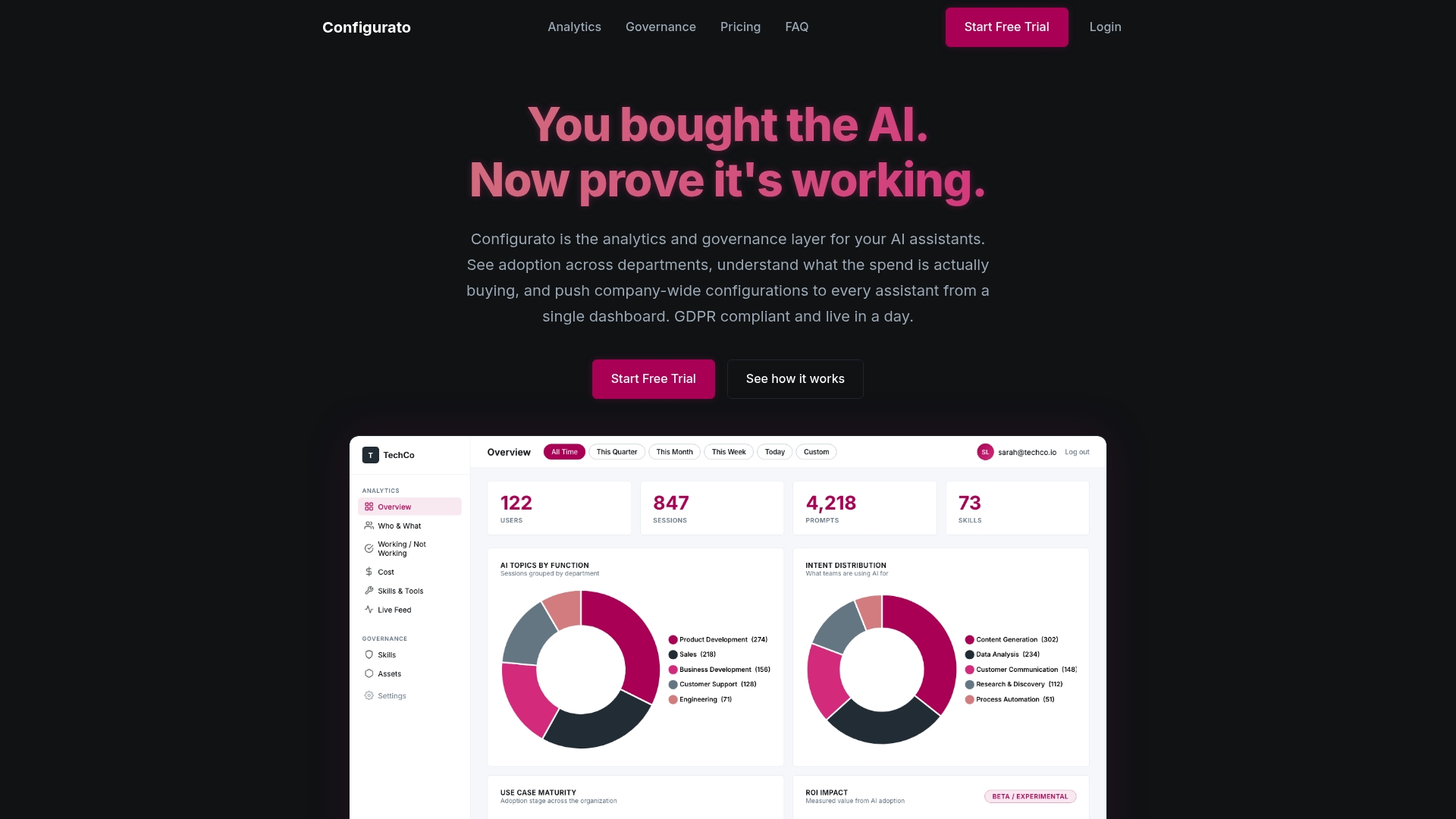
Configurato, built by Tekkr, gives you real-time analytics, robust governance, and workflow-specific AI assistant configuration across whatever tools your team already uses. Whether you are running Claude, Copilot, GPT, or Gemini, Configurato embeds your company’s processes directly into the assistant’s output. No retraining your team. No rework cycles. Just better output, faster. Explore Configurato and see how teams like yours are turning AI adoption from a metric into a competitive advantage.
Frequently asked questions
What are some real-world AI assistant examples for tech teams?
Cisco’s internal assistant is a standout example, with 73% of users reporting increased productivity and an average of five hours saved per week across the workforce.
How do specialized AI assistants differ from general LLM-based ones?
Specialized AI assistants can outperform general LLMs on behavioral and efficacy metrics, particularly in domains like leadership coaching and accountability, where outcome quality matters more than raw task speed.
What are the main criteria for choosing an AI assistant?
Focus on productivity impact, integration fit, governance controls, and workflow alignment. The strongest enterprise deployments prioritize role-specific access, enterprise knowledge grounding, and action orchestration over chat-only features.
How can we ensure high adoption of AI assistants in our teams?
Start with a focused pilot, define measurable success metrics upfront, and configure the assistant to your team’s specific workflows from day one. Cisco’s deployment of 156,000 daily interactions across 4,300+ teams shows what sustained adoption looks like when integration is done deliberately.